A property operator purchases Bluetooth smart locks for a new apartment project. The locks support PIN codes, mobile access, and app-based management. Everything seems ready for installation.
But after deployment, the operator discovers that certain management tasks still require someone to stand near each door. Changing credentials stored in the locks, retrieving recent access records and checking device status remotely are not as straightforward as expected.
The missing piece may be a smart lock gateway. For hotels, rental apartments, and commercial buildings, this misunderstanding can lead to additional hardware purchases, network adjustments and unnecessary site visits.
However, not every Bluetooth smart lock project needs a gateway, and adding one does not automatically solve every management or integration requirement. The right starting point is to understand which operations your project needs, how those operations communicate with the locks, and what infrastructure is required to support them.
This guide explains when a gateway matters, what it can and cannot do, and how B2B buyers should evaluate gateway requirements before purchasing smart locks.
1. Does a Bluetooth Smart Lock Really Need a Gateway?
The answer depends on what you expect the lock to do. A Bluetooth smart lock communicates directly with a nearby smartphone. It can also support local access methods such as PIN codes, RFID cards or fingerprints, depending on its hardware and software configuration.
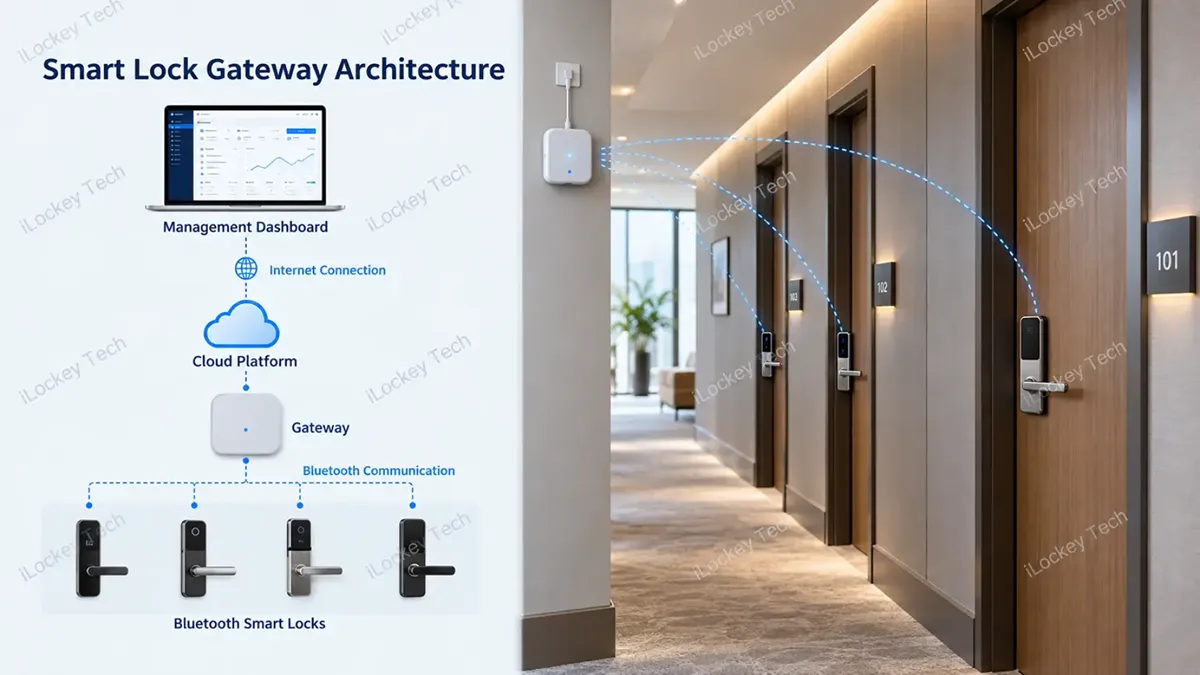
A gateway creates an additional communication path between the lock and the internet. The lock communicates with the gateway through Bluetooth, while the gateway connects to the cloud platform through its supported network connection.
This allows the management platform to communicate with the physical lock even when the administrator is not nearby.
1) What can a smart lock do without a gateway?
For example, within the TTLock ecosystem, administrators can send eKeys and generate certain supported passcodes without establishing a live gateway connection to the lock.
However, remotely modifying credentials stored in the lock, performing remote unlocking, and automatically uploading access records are examples of operations that require gateway connectivity in the relevant Bluetooth lock configuration.
The distinction is important: Sending access information to a person is not always the same as sending a live instruction to the lock.
| Operation | Without Gateway | With Gateway |
| Nearby Bluetooth unlocking | Supported | Supported |
| Local PIN/RFID/fingerprint access | According to lock model | According to lock model |
| Sending supported eKeys | May work without gateway | Supported |
| Generating supported algorithm-based passcodes | May work without gateway | Supported |
| Remotely changing lock-stored credentials | Generally requires nearby access | Possible when supported |
| Remote unlocking | No live remote connection | Possible when supported |
| Automatic access record upload | Requires another synchronization method | Possible when supported |
| Remote lock status monitoring | Limited without live connectivity | Possible when supported |
Note: This comparison describes a typical Bluetooth smart lock architecture, with TTLock as a relevant example. Exact capabilities depend on the lock model, firmware and management platform.
For B2B buyers, the question should therefore be: Which operations must our team perform without visiting the door? Once those requirements are clear, it becomes much easier to determine whether a gateway is necessary.
2. What Does a Gateway Actually Change for Your Business?
A gateway is not valuable simply because it connects a smart lock to the internet. Its value comes from the management tasks that connectivity can support.
1) Reduce unnecessary site visits
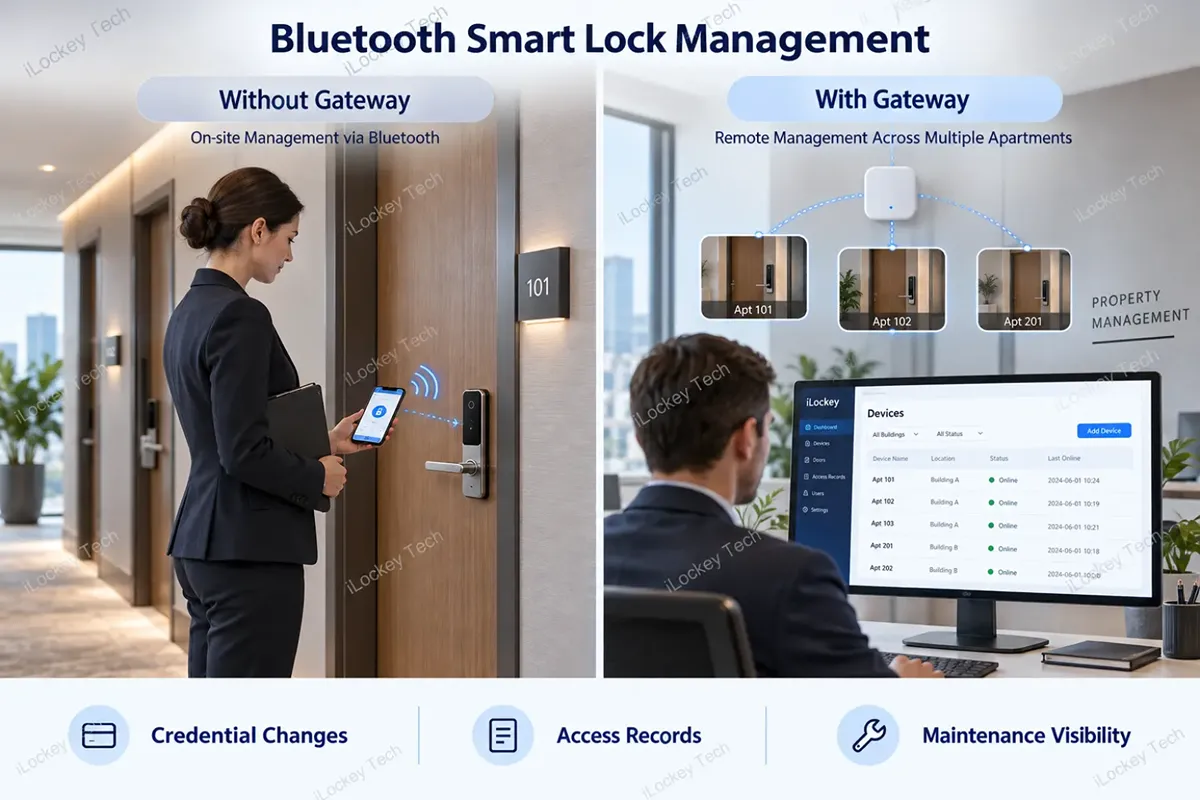
Consider an apartment operator managing units across several buildings. Without a live connection to the locks, certain credential changes may require a staff member to visit the property and communicate locally through Bluetooth.
With a compatible gateway, supported credential changes can be sent remotely through the management platform. This can reduce routine site visits, particularly when tenants change, maintenance access needs to be adjusted, or temporary permissions must be updated.
2) Improve visibility across multiple properties
Access records are useful for investigating reported access problems, reviewing maintenance activity and checking whether an authorized entry occurred. Without automatic synchronization, administrators may need to retrieve records locally.
A gateway can allow supported access records to be uploaded automatically, reducing the delay between a physical event and its visibility in the management system.
3) Support remote troubleshooting
When connected equipment supports the relevant status reporting, a gateway may help administrators check information such as lock battery status or device connectivity without visiting every door.
This does not eliminate maintenance work. It helps property teams identify which doors may need attention before sending staff to the site. The result is not necessarily a fully automated property. It is a management process with fewer unnecessary physical interventions.
3. Which Smart Lock Projects Need a Gateway — and Which Do Not?
Not every project benefits equally from gateway connectivity. The decision should follow the operating model rather than the number of features listed in a product catalogue.
| Application | What to Evaluate |
| Small office with on-site administration | Local Bluetooth and existing credentials may be sufficient |
| Hotel with an established local card management workflow | Gateway needs depend on the selected hotel system and remote operations |
| Long-term rental apartments | Remote credential changes and access record synchronization may justify gateways |
| Distributed rental properties | Live remote management may reduce travel between properties |
| Commercial buildings with many doors | Evaluate centralized management, access policies and network infrastructure |
1) Hotels and serviced apartments
In a hotel project, the main question is not simply whether every guestroom needs a gateway. It is whether the selected hotel management system requires continuous communication with room locks for the intended workflows.
A hotel using a compatible local card-issuing system may not need a gateway for every routine guest check-in operation. However, requirements for remote lock operations, automatic record synchronization or centralized device monitoring may change the architecture.
Before selecting hardware, confirm how the chosen hotel software issues credentials, what happens when the network is unavailable and which operations require an online connection.
2) Long-term and distributed rental properties
Gateway connectivity can be particularly relevant for apartment operators managing properties across multiple buildings or locations. For example, an operator may need to change a maintenance worker’s access permissions, review access records or support a tenant without sending an administrator to every property.
A compatible gateway can support selected remote operations, while the cloud platform provides the management interface. However, a small apartment property with stable tenants and a local management team may have little need for continuous connectivity.
The right solution depends on how often access permissions change and which tasks genuinely require remote communication with the locks.
4. A Gateway Is Not the Same as System Integration
One of the most common misunderstandings in commercial smart lock projects is assuming that adding a gateway automatically makes the locks compatible with an existing property management system.
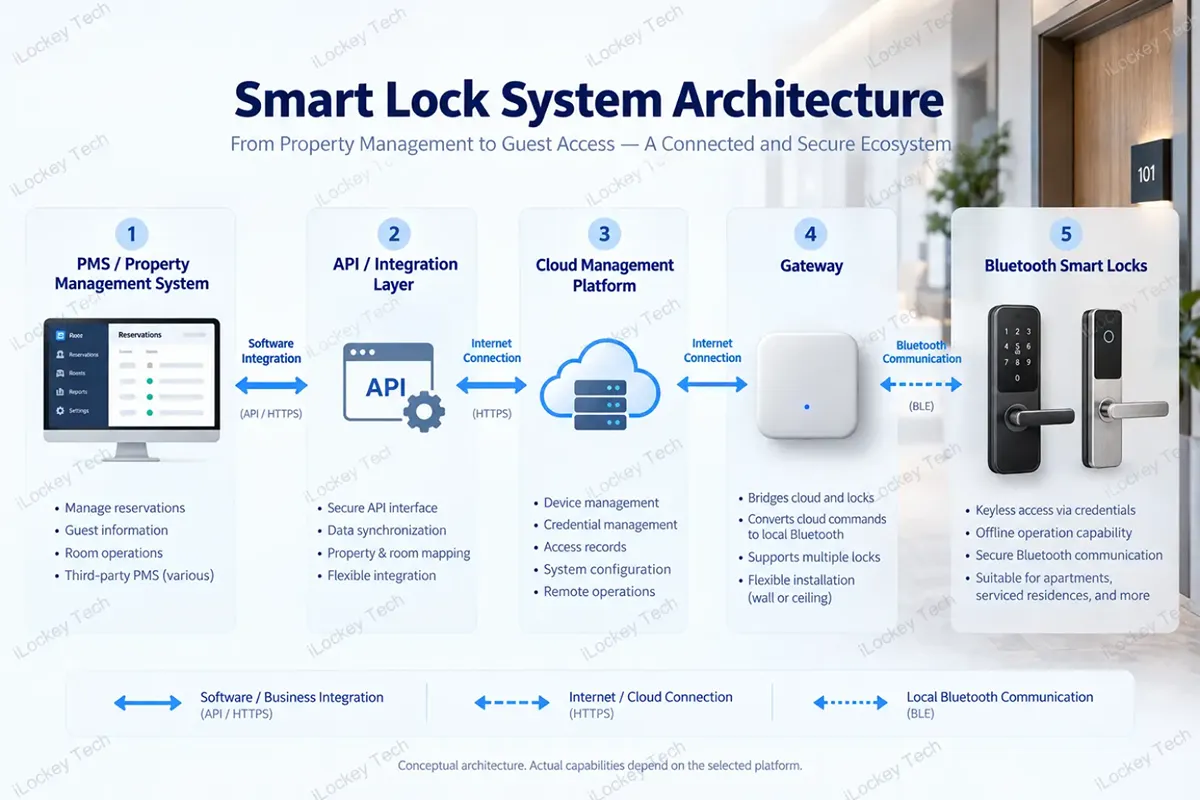
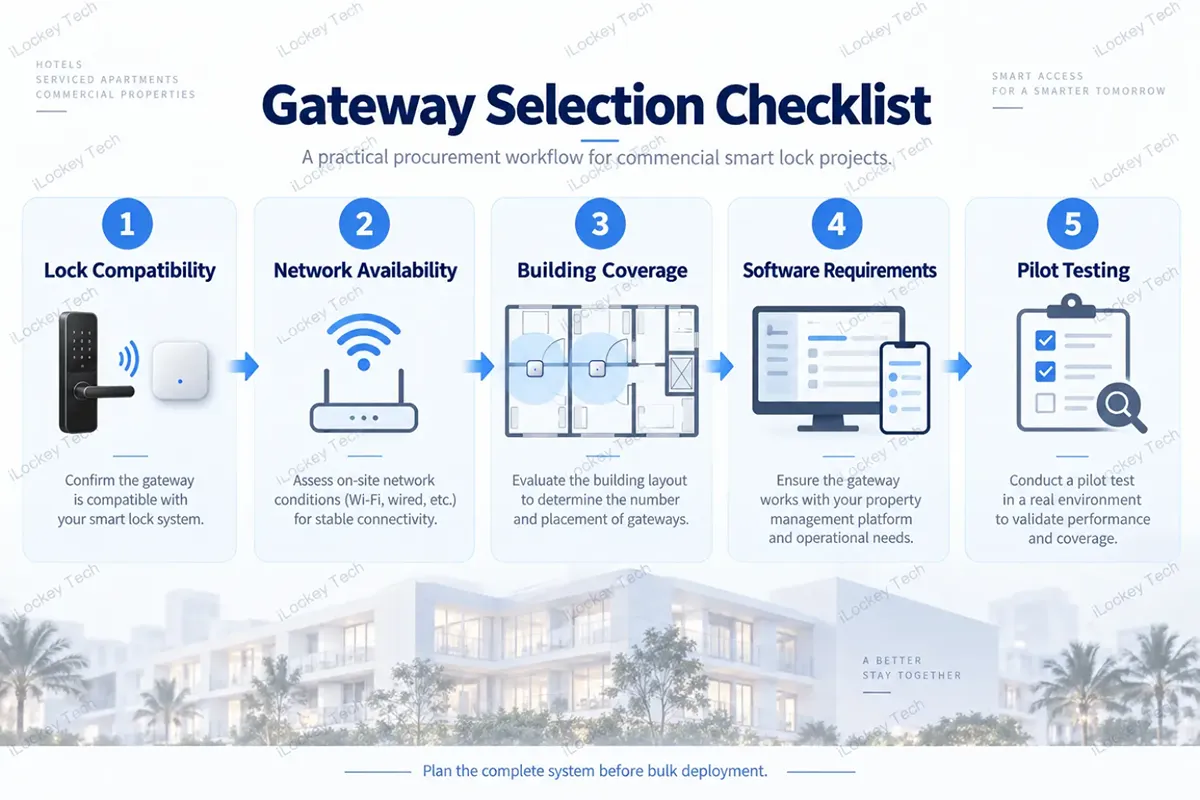
These are two different requirements. A gateway provides a communication path between compatible locks and their associated cloud platform. An API or SDK, where available, allows external software to access supported platform functions or data.
A PMS or property management system manages business workflows such as reservations, room assignments, tenant records or access authorization requests. A simplified architecture looks like this:
| System Layer | Primary Role |
| PMS / Property Management System | Business workflow |
| Supported API / Integration Layer | Supported data exchange and external commands |
| Cloud Management Platform | Cloud-side lock and credential management |
| Gateway | Remote network communication |
| Bluetooth Smart Lock | Physical access and local credential enforcement |
Conceptual system architecture — actual integration capabilities depend on the selected ecosystem. For example, a rental management platform may need to create an access credential when a new reservation is confirmed and update that credential when the booking changes.
Whether these actions can be automated depends on the specific platform’s interfaces, credential logic, and supported lock operations—not simply on whether a gateway is installed. TTLock, TTHotel, Tuya and other management ecosystems should therefore be evaluated separately. They should not be assumed to share identical gateway or integration capabilities.
Before placing an order, ask your supplier to confirm the actual lock model, gateway, software platform and available integration documentation for the intended workflow.
5. One Gateway Does Not Mean Unlimited Coverage
Once a project requires gateways, the next question is usually: How many gateways do we need? Buyers sometimes try to calculate gateway quantity by dividing the total number of locks by a gateway’s advertised maximum device capacity.
For commercial projects, this is not sufficient. Two different limitations must be considered.
1) Device capacity vs. actual signal coverage
Device capacity refers to how many compatible locks a gateway can support under its hardware and platform specifications.
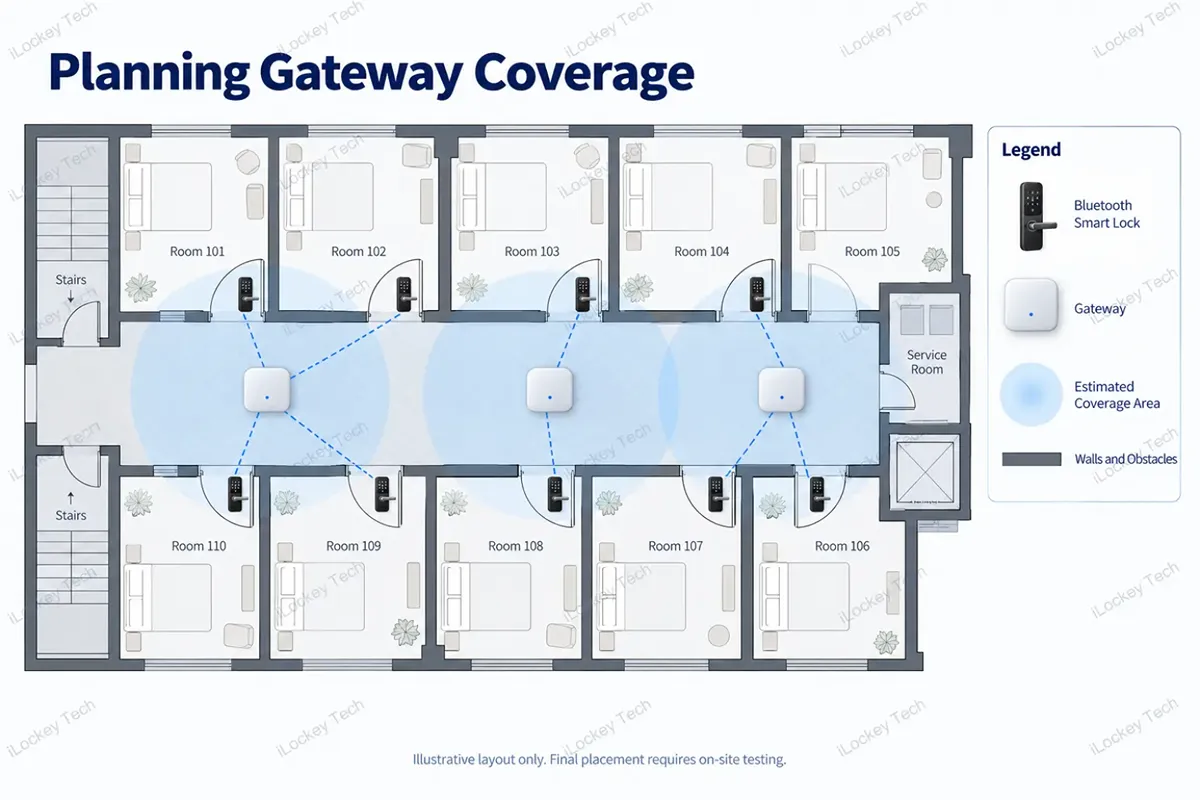
Signal coverage refers to how reliably the gateway can communicate with those locks in the actual building. For example, a gateway may be capable of managing multiple locks, but several guestrooms behind reinforced walls and metal fire doors may fall outside reliable Bluetooth coverage.
TTLock’s published guidance gives approximately 10 meters in an unobstructed environment as a gateway range reference. This should not be treated as a guaranteed radius inside a hotel or apartment building.
Therefore, a hotel with 100 rooms cannot determine its gateway quantity from the lock count alone.
2) Start with the building layout
Before calculating gateway quantities, review the physical installation environment. Important factors include the distance between locks, wall construction, metal structures, available power outlets, network coverage and the proposed gateway locations.
Where the chosen platform provides signal-strength information, it can be used to support installation testing. For example, TTLock’s Open Platform provides RSSI information describing the signal strength between a gateway and associated locks.
However, signal readings should be evaluated together with actual communication tests rather than used as the only acceptance criterion.
3) Test a representative area first
For a hotel or large apartment project, consider a pilot installation covering several representative doors. Test the gateways under the expected operating conditions, including doors closed and the building’s normal network environment.
Check whether the required remote operations work consistently, whether access records synchronize as expected and whether the proposed gateway locations remain accessible for future maintenance.
The final gateway quantity should follow these results. A reliable gateway plan is based on tested coverage, not simply the maximum number of locks listed in a specification sheet.
6. What Happens If the Gateway or Internet Goes Offline?
For hotels and apartment operators, this question can be more important than the gateway’s technical specifications. A gateway failure should not automatically mean that guests or tenants lose access to their rooms.
In a typical battery-powered Bluetooth lock system, credentials already stored in the lock can continue to operate locally according to the lock’s own access rules. For example, a valid PIN code or RFID card may continue working even when the gateway loses its internet connection.
However, operations requiring live remote communication may become unavailable until connectivity is restored. Access records may also remain stored locally until they can be synchronized.
The exact behavior depends on the lock model, credential type, firmware, and management platform.
Before full deployment, a project team should test three situations:
- Internet connection unavailable
- Gateway disconnected or without power
- Lock operating independently with its existing valid credentials
This helps establish a clear maintenance and emergency access procedure before the property becomes operational.
7. The Gateway Price Is Not the Total Cost of Remote Management
For a B2B buyer, the lowest gateway unit price does not necessarily produce the lowest overall project cost. A gateway may be shared by several locks, but the total investment also depends on how many gateways are required, where they can be installed and which additional services are needed.
Consider the following cost components:
| Cost Component | What Buyers Should Confirm |
| Smart lock hardware | Model, quantity and required access methods |
| Gateway hardware | Compatible model and estimated quantity |
| Power supply | Outlet availability, adapters and installation requirements |
| Network infrastructure | Existing Wi-Fi, Ethernet or cellular connectivity |
| Installation | Gateway mounting, configuration and testing |
| Cloud management | Applicable platform and service charges |
| Software integration | API availability and third-party development responsibilities |
| Maintenance | Spare units, replacement and future expansion |
Some projects may already have suitable Wi-Fi coverage and available power outlets, making gateway deployment relatively straightforward. Others may require additional infrastructure or more gateways because of their building layout.
A low-frequency, locally managed installation may not benefit enough from remote connectivity to justify those additional costs. The purpose of gateway planning is therefore not to minimize the number of devices at all costs. It is to select a configuration that supports the required business operations without unnecessary hardware or deployment expenses.
8. How to Choose the Right Gateway for Your Smart Lock Project?
Once the required operations and building conditions are clear, gateway selection becomes more systematic.
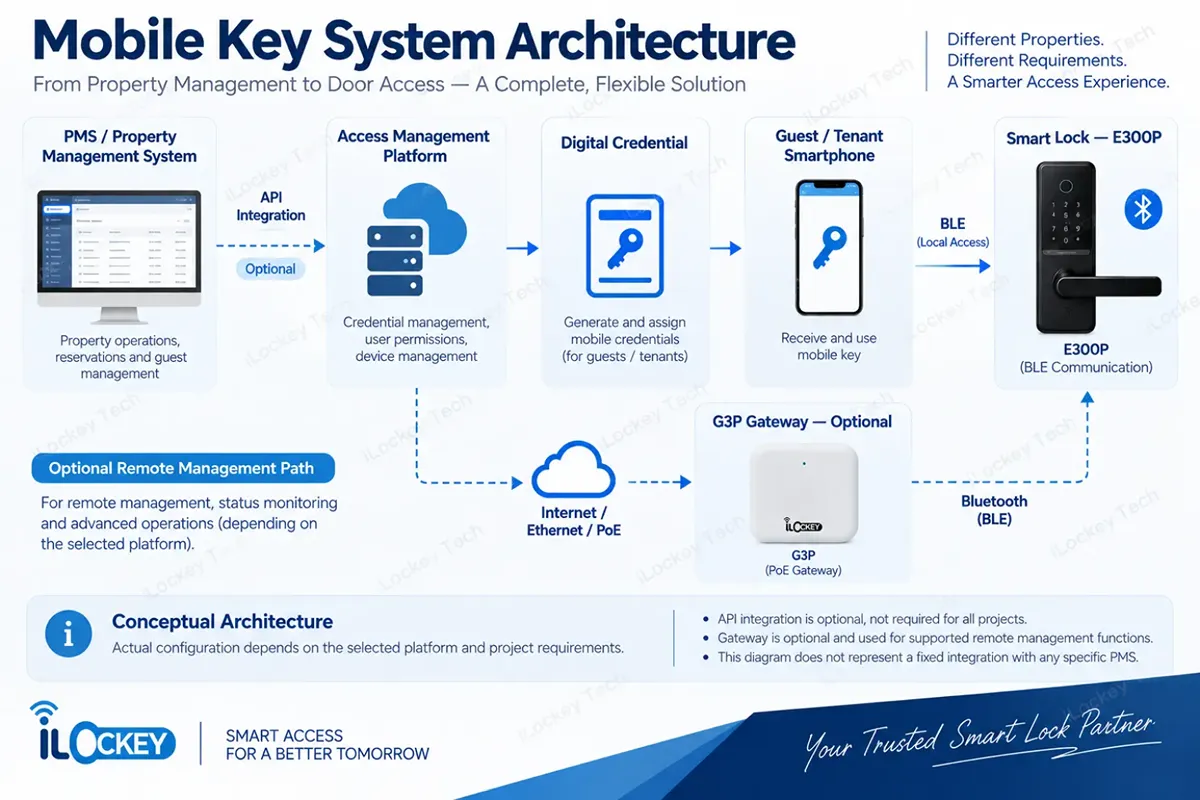
1) Step 1: Confirm lock and gateway compatibility
Start with the actual smart lock model and management platform. Do not assume that any Bluetooth gateway can communicate with any Bluetooth smart lock.
Compatibility may depend on the application protocol, firmware, security mechanisms and associated cloud ecosystem. For example, when selecting hardware for a TTLock-based project, confirm that the gateway and lock are compatible within the intended TTLock configuration.
2) Step 2: Identify the available network
Gateway models may use different network connections.
| Gateway Connection | Typical Consideration |
| Wi-Fi | Useful where suitable wireless network coverage is available |
| Ethernet | Relevant where wired network infrastructure is available |
| Cellular | May be considered for locations without a suitable fixed network |
The available options depend on the specific gateway model and ecosystem. Also confirm the power supply requirements. An Ethernet port does not automatically mean the gateway supports PoE power, and 5 GHz Wi-Fi should not be confused with 5G cellular connectivity.
3) Step 3: Review building coverage
Use the floor plan and representative installation tests to estimate the required gateway positions and quantities.
Avoid making the final purchase decision solely from an advertised communication distance.
4) Step 4: Confirm software requirements
List the exact management operations required by the project.
If the customer needs PMS or property management integration, confirm the corresponding platform documentation and responsibilities before placing the hardware order.
5) Step 5: Validate the configuration before bulk deployment
For larger projects, test a representative combination of locks, gateways, network equipment and management software.
A successful pilot can help identify compatibility, communication and workflow issues before they affect the entire installation.
9. Frequently Asked Questions About Smart Lock Gateways
1) Does every Bluetooth smart lock need a gateway?
No. A gateway is mainly relevant when the project requires supported operations that depend on a live remote connection to the lock. For locally managed installations, Bluetooth access and existing lock credentials may be sufficient.
2) Can I generate a passcode remotely without a gateway?
In platforms such as TTLock, certain algorithm-based passcodes can be generated and shared without a live gateway connection. However, remotely adding or modifying a custom credential stored in the lock may require a gateway. Confirm the exact credential type and supported operation before purchasing.
3) How many smart locks can one gateway manage?
There is no universal answer across gateway models and buildings. Buyers should confirm the specific model’s supported device capacity and test its actual communication coverage in the project environment.
4) Will smart locks stop working if the gateway loses internet?
Not necessarily. In a typical Bluetooth lock system, valid locally stored credentials may continue working, while remote operations and automatic synchronization are interrupted. The actual offline behavior should be verified for the selected lock and management platform.
5) Can a TTLock gateway work with any Bluetooth smart lock?
No. Sharing the same Bluetooth wireless technology does not guarantee compatibility. The gateway must be compatible with the lock’s communication protocol and associated management ecosystem.
10. Planning a Smart Lock Project? Let iLockey Help You Evaluate the Requirements.
Whether you are sourcing smart locks for hotels, rental apartments or commercial buildings, iLockey can help you review compatible lock and gateway options based on your project requirements.
Share your floor plan, number of doors, preferred lock models, available network and management requirements with our team.
We can help identify the hardware configuration and compatibility questions that should be resolved before sample testing or bulk deployment.
Contact iLockey to Discuss Your Smart Lock Project →
11. Conclusion
A smart lock gateway can support remote credential management, automatic record synchronization, and connected property operations, but it is not a requirement for every installation. Before purchasing, define which operations must be performed remotely, confirm the lock and platform compatibility, review the building layout, and test the proposed gateway configuration.
For commercial projects, these decisions should be made before installing the locks—not after the property becomes operational.