A hotel, an apartment building and a gym may all need smart locks. But they don’t need the same type of lock—or the same way of managing access. Guest credentials must be issued and expire at a hotel. Tenant turnover is a problem that needs to be addressed by an apartment operator. It could be hundreds of lockers that a gym needs to be able to assign, release and reuse throughout the day.
Selecting the wrong lock type can cause issues that will be very hard to solve after installation: Incompatibility with the door hardware, additional gateways, complex credential management or increased maintenance expense. First there’s a bigger question: What about fingerprints before comparing them to the RFID cards, Bluetooth or Wi-Fi?
What is it that you want the lock to control?
This guide provides an overview of the most common lock types for commercial applications, the situations in which each type is used, and the factors to consider when ordering a smart lock and the management system.
1. Before Choosing a Smart Lock, Define What You Need to Secure
The first practical distinction in most commercial projects is simple: Are you controlling access to a space or access to a storage unit? This will help you to decide which locks to start with: smart door locks or smart cabinet/locker locks.
1) Smart Door Locks: Controlling Access to Spaces
Smart door locks are designed for building entrances, guest rooms and apartments, offices and other controlled areas.
Their choice goes beyond access credentials. Users should also take into account how the doors are built, mechanical locking needs, compatibility with the door installation and how access is going to be controlled.
2) Smart Cabinet and Locker Locks: Controlling Access to Storage
Smart cabinet locks are used for securing individual storage spaces like office cabinets, gym lockers, school lockers and shared storage spaces.
In larger projects, management needs could include locking points, number of individual locking points, changing user credentials and releasing occupied lockers.
3) Smart Door Locks vs. Smart Cabinet Locks
| Comparison | Smart Door Locks | Smart Cabinet / Locker Locks |
| Primary application | Rooms and building access | Individual storage units |
| Typical users | Guests, tenants, employees, visitors | Employees, members, students, guests |
| Installation | Door panels, mortises, latches or cylinders | Cabinet panels, locker doors and catches |
| Management priority | Access permissions and occupancy changes | Storage assignment and access turnover |
| Deployment | Distributed across rooms and entrances | Often installed in concentrated groups |
| Maintenance | Door hardware, credentials and batteries | Large-scale battery and locker maintenance |
Both are not necessarily more advanced than each other. They address various operational issues.

2. Different Projects Need Different Smart Door Locks
Smart door locks are not all the same. The correct setup will vary depending upon the entry points, frequency of user changes, and who is responsible for the entry changes.
1) Hotel Door Locks: Managing Guest Turnover
A hotel lock should be able to accommodate the hotel guest access procedure.
RFID key cards can be issued by front-desk personnel or other properties may opt for mobile keys or pin-based access. Credentials must be consistent with reservation periods, room assignments, hotel’s operating times, etc.
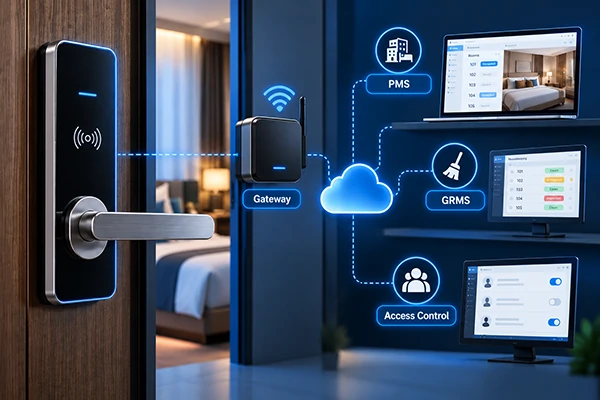
Other hotels adopt offline RFID system, which has a local card encoder. Others need to be managed in a connected way or connected to their property management system (PMS). Before selecting a hotel lock, buyers should confirm:
- How guest credentials are issued and expired.
- Whether mobile access is required.
- Whether the lock must work during an Internet outage.
- Whether PMS integration is required and supported by the selected platform.
The hotel lock should be a part of the hotel’s operating routine and should not be the reason the hotel has to change its routine.
2) Apartment Smart Locks: Managing Tenant Access
Contrast this with apartment operators, who have a problem of longer tenancy periods but the need to authorize access when tenants move in and out. Depending on management requirements, you can consider Bluetooth smart locks, gateway-connected locks and direct Wi-Fi locks.
For a small property, local Bluetooth management may be sufficient. For a distributed rental portfolio, remote credential management may become more important. The key question is not simply whether the lock supports an app.
It is whether or not the chosen system is suitable with the property’s existing tenant management system.
3) Commercial Office Smart Locks: Managing Staff and Visitors
There’s a fairly consistent set of users in an office, plus the occasional visitor, contractors, and varying user permissions. Correct access can be PIN codes, fingerprint access, RFID card or app based credentials depending on the project.
Purchases must account for how administrators will add employees, cancel credentials, manage visitor access, and retrieve access records (if available). The type of existing door hardware and the access control system in the building could also affect the selection. Another scenario involves co-working spaces, where it is necessary to consider co-working space smart lock solution tailored to the specific needs of the environment.
4) Special Door Types: When Installation Determines Your Options
Not all doors are suitable for standard smart locks. The glass door, narrow stile aluminum door, retrofit cylinders and rim-lock doors might need to have different hardware designs.
If a lock cannot be installed properly, it is not suitable with the preferred mode of access. For these projects, begin with examples of photos of doors, dimensions and existing hardware specifications before choosing a model.

3. Cabinet and Locker Locks: A Different Management Problem
A locker lock isn’t just a smaller door lock. The management process can be as important as the locking mechanism in a project that has hundreds of storage units.
1) Standalone Cabinet Locks
Individual that RFID cabinet locks, PIN cabinet locks and fingerprints cabinet locks are ideal for situations where each cabinet could be operated independently. This can be office document cabinets, individual storage units and small locker installations.
Consumers should verify material of cabinet, thickness of panels, locking system and credential capacity and emergency access method.
2) Managed Locker Systems
If the facility is a gym, school or shared facility, a more structured locker management may be necessary. An assigned-use system is where one user is assigned to a specific locker.
Free-use means that lockers can be used and unlocked by multiple users. These modes apply to different operating models, and should be verified with the actual lock and management system.
Buyers should also seriously consider credential issuance, emergency opening and maintenance throughout the installation, as well as battery replacement for a large locker project.
Even a high-tech lock and key is of little use if it can’t be easily managed day in and day out.
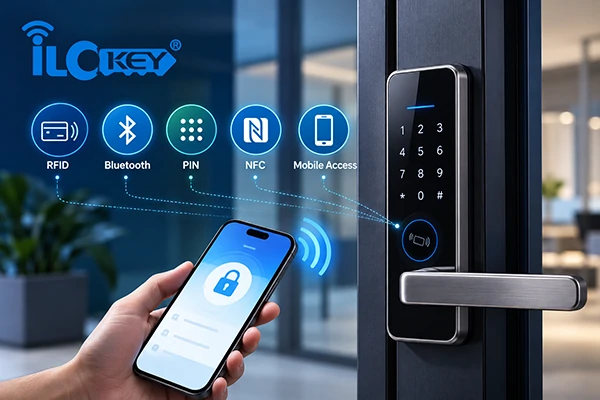
4. Choosing an Unlocking Method Is Not the Same as Choosing a Management System
This is one of the most critical differences to consider when choosing a smart lock. The methods of user authentication or access are called fingerprint, PIN, RFID and Bluetooth. Locks that are Wi-Fi and gateways are compatible with a management system.
Access method and management architecture are two different decisions.
1) Compare Access Methods by User Workflow
| Access method | Typical application | What buyers should consider |
| RFID card | Hotels, offices, lockers | Credential and reader compatibility |
| PIN code | Apartments, visitors, shared spaces | Issuance, expiration and cancellation |
| Fingerprint | Fixed-user environments | Enrollment and user changes |
| Bluetooth | App-managed access | Phone compatibility and near-field operation |
| Mobile Key | Hotels and managed properties | Platform and guest workflow |
| Mechanical key | Emergency access where provided | Physical key management |
The available methods depend on the selected model and software platform.
2) Standalone and Offline Management
Offline systems can be suitable where continuous remote connectivity is unnecessary. For instance, one possible configuration for an offline hotel RFID system would be to distribute a credential at the front desk using an encoder without having to wire up a gateway in each guest room.
The disadvantage is that management actions and access records may not be available remotely and at the time of the access.
3) Bluetooth Local Management
When a compatible phone or management device is in communication range, Bluetooth smart locks communicate with it. These can serve well in projects which tolerate on-site management.
But don’t expect all remote functions to be available for a Bluetooth lock without extra setup.
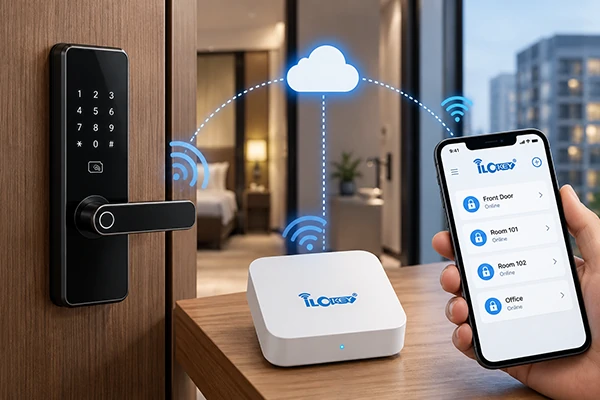
4) Bluetooth + Gateway Remote Management
A compatible gateway connects supported Bluetooth locks to a wider network and cloud management system. This can allow for remote operation supported without the administrator having to stand beside all locks.
For the actual building, the gateway quantity, coverage, connectivity and platform compatibility must be evaluated.
5) Direct Wi-Fi Management
A direct Wi-Fi smart lock is a smart lock that connects to a compatible wireless network directly, instead of via a separate Bluetooth gateway. However, direct connectivity introduces other considerations, including Wi-Fi coverage, power consumption and network reliability.
6) Hotel Management Systems
Hotel Locks Management is to be considered independently of residential smart lock management software. The hotel locking system may include card encoding, front desk software, guest credentials, and potentially PMS integration.
Compatibility with PMS, availability of API and software requirements have to be checked in the particular case. Don’t think that locks of the same brand, the same app type, or using the same type of communication have the same management software.

5. A Lock That Cannot Fit Your Door Is Not the Right Lock
Before making comparisons, ensure that advanced features can be installed hardware.
The door locks may have relevant information such as the type of door, thickness, existing mortise, backset, direction of opening, and dimensions of the space.
Different hardware options are needed for a glass door than for a wood door, if the narrow, aluminum frames are used instead.
The thickness of the panels and the material of the cabinet, the gap between cabinet and door, and the location of the locking catch also demand different circumstances in cabinet projects.
Environmental factors also play a role. The following should be considered using the actual product specification and project requirements: Outdoor exposure, Humidity, Fire door requirements.
With fire-rated doors, the compatibility must be determined using evidence of testing or approval of the door assembly, and not by appearance of the lock.
The right selection process begins with physical compatibility, then access methods and management features.
6. How to Choose the Right Smart Lock in Four Steps
You don’t have to compare each and every smart lock available on the market. You must eliminate the choices in the proper sequence.
1) Step 1 — Define the Application
Do you need a guest room, apartment, office, glass door, cabinet or locker secured? Determine the installation surface and physical needs first.
2) Step 2 — Define the Users
Will the lock be used by long-term inhabitants, permanent staff, short-term guests or users that are changing often? This will dictate the credential workflow.
3) Step 3 — Define the Management Architecture
Will administrators work on-site or remotely? Are you looking for a standalone system, Bluetooth management, gateways, direct Wi-Fi or a hotel management platform?
If it is necessary to integrate with an existing system, check compatibility before ordering.
4) Step 4 — Evaluate the Complete Project
Consider the hardware, accessories, software, installation and maintenance requirements. In larger projects, for the selected configuration, test the operation under realistic conditions before full deployment.
5) Quick Smart Lock Selection Table
| Project | Typical starting point | Management priority |
| Hotel guest rooms | RFID / Mobile-Key Hotel Lock | Guest credential lifecycle |
| Rental apartments | BLE / Gateway / Wi-Fi Smart Lock | Tenant access |
| Commercial offices | PIN / RFID / Fingerprint Door Lock | Staff and visitor permissions |
| Gym lockers | RFID / PIN Locker Lock | Locker turnover |
| Office cabinets | Electronic Cabinet Lock | Authorized storage access |
| Glass doors | Compatible Glass Door Lock | Entry permissions |
This table is for guidance only. Final configuration should be checked with the project door conditions, management process and technical requirements.
7. The Real Cost of a Smart Lock Project Goes Beyond the Lock Price
Lower lock price does not necessarily equate to lower project cost.
Ponder two hardware quotes that are comparable. Additional gateways, card encoders or installation may be required for one. Another could require different software or maintenance fees.
When looking at the whole project, the comparison changes.
1) What Should Be Included in the Total Cost?
| Cost category | Items to evaluate | Cost category |
| Lock hardware | Locks, mortises and mounting accessories | Lock hardware |
| Credentials | RFID cards, wristbands or other credentials | Credentials |
| Network equipment | Gateways, routers and required connectivity | Network equipment |
| Software | Platform, integration and applicable service fees | Software |
| Installation | Door preparation and lock fitting | Installation |
| Commissioning | Configuration, testing and staff training | Commissioning |
Hardware cost could be a key factor in a small installation. Commissioning and continued administration may be as significant for a large, multi-apartment building or locker project as for a large hotel.
When you get price quotes, request an entire configuration from the supplier instead of just lock prices.
8. Questions to Ask Your Smart Lock Supplier Before Ordering
After determining the correct type of lock, the next step is to confirm the product and project configuration. A supplier is able to assist in answering the following questions:
- Can the lock fit the existing door or cabinet without unacceptable modification?
- Which access methods are supported by the selected model?
- Does remote management require a gateway or another network connection?
- Is the required software or third-party integration available?
- Can existing RFID credentials or accessories be reused?
- What happens when the Internet is unavailable?
- What customization, MOQ and lead-time conditions apply?
- What warranty, spare parts and technical support are available?
Sample testing can help uncover compatibility and workflow issues in projects with multiple doors or lockers before these issues impact the entire project.
The intent of a sample isn’t just to determine if the lock opens. To check if the full solution is effective for the project.
9. Smart Lock Types for Commercial Projects FAQs
The following are some common questions.
1) Can smart door locks and cabinet locks use the same management platform?
There are some models of door locks and cabinet locks that are compatible with the same app, RFID credentials, gateway or management platform.
But, depending on the actual products and software ecosystem, compatibility is a requirement. Don’t assume that hotel lock systems and home smart lock schemes are the same automatically.
2) Do Bluetooth smart locks always require a gateway?
No. Compatible Bluetooth locks can support local communication without a gateway.
A gateway may be required when the project needs supported remote management functions. This varies depending on the software platform and the model.
3) Can I use third-party RFID cards or gateways?
Before ordering in bulk, it is important to check compatibility.
There can be different types of chips, credential formats and security levels within RFID cards. It is important gateways are also compatible with your chosen lock and management platform.
4) Which smart lock type is suitable for a hotel?
It might be a good beginning to use an RFID hotel lock or a mobile-key hotel lock.
The decision-making process regarding the choice of technology will be dependent on many factors – type of guest workflow, software that exists, infrastructure, and credentials that are necessary, door hardware, and the budget that can be spent on implementation.
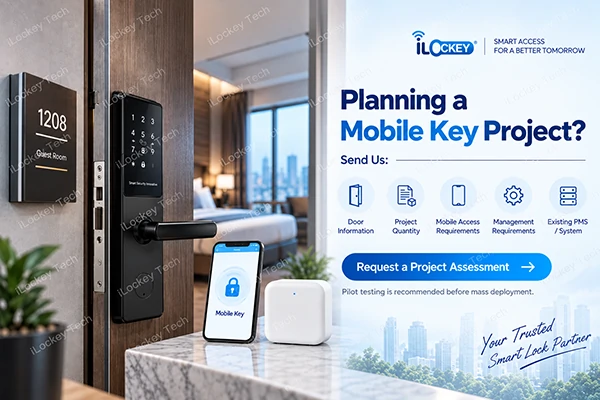
5) What information should I prepare before requesting a quotation?
Plan the type of application, number of projects, dimensions of the door or cabinet and preferred access and management.
For an existing PMS or other software application, include the name of the platform and integration needs.
6) Should I test samples before placing a bulk order?
Where existing doors are used, projects are high-risk or there is a need for software integration with a new credential system, then sample testing is recommended.
It provides customers with a chance to test installation and access capabilities and management workflows before full deployment.
10. Not Sure Which Smart Lock Fits Your Project?
Do not think about the exact model when contacting the supplier.
Inform iLockey about the object you are going to secure, the amount of locks required, users of the locks and how the access to the locks will be controlled.
Share the door or cabinet size, any preferred access, existing software needs. Our staff can assist you in narrowing it down, ensure hardware compatibility and determine what should be tested prior to bulk deployment.

11. Conclusion
The unlocking technology that represents the best smart lock is not necessarily the one that has the largest amount of unlocking technologies or lowest price per unit. It is the one that corresponds with the installation peculiarities, user workflow and management requirements of the project.
Firstly, decide what kind of lock you need: a cabinet lock or a door lock. Consider who will use it and what system of permission handling will be used. After answering these questions, you will find it much easier to compare various features.