What if the biggest opportunity in mobile key technology isn’t the way guests open doors, but the way properties manage access?
Consider a typical hotel check-in process. A guest arrives, confirms a reservation, receives a key card, and heads to the room. If the card is lost or damaged, the front desk may need to issue another one.
Now consider a different workflow. The guest completes the required check-in steps, receives an authorized digital credential, and uses a smartphone to access the assigned room. When the stay ends, the credential expires according to the system’s access rules.
The door still opens. What changes is the process behind it.
For hotels, serviced apartments, and property operators, mobile key access may reduce manual credential handling and support more flexible access management. But these benefits do not come simply from choosing a lock with Bluetooth. They depend on credential issuance, door compatibility, software, network architecture, and operational procedures.
This guide explains how to evaluate a mobile key smart lock as part of a complete access solution—not just another product feature.
1. What Is a Mobile Key, and How Does It Work?
A mobile key is a digital credential that lets an authorized smartphone interact with a compatible smart lock. Depending on the access platform, the credential can be assigned to a user, door, room, or access group and given a defined validity period.
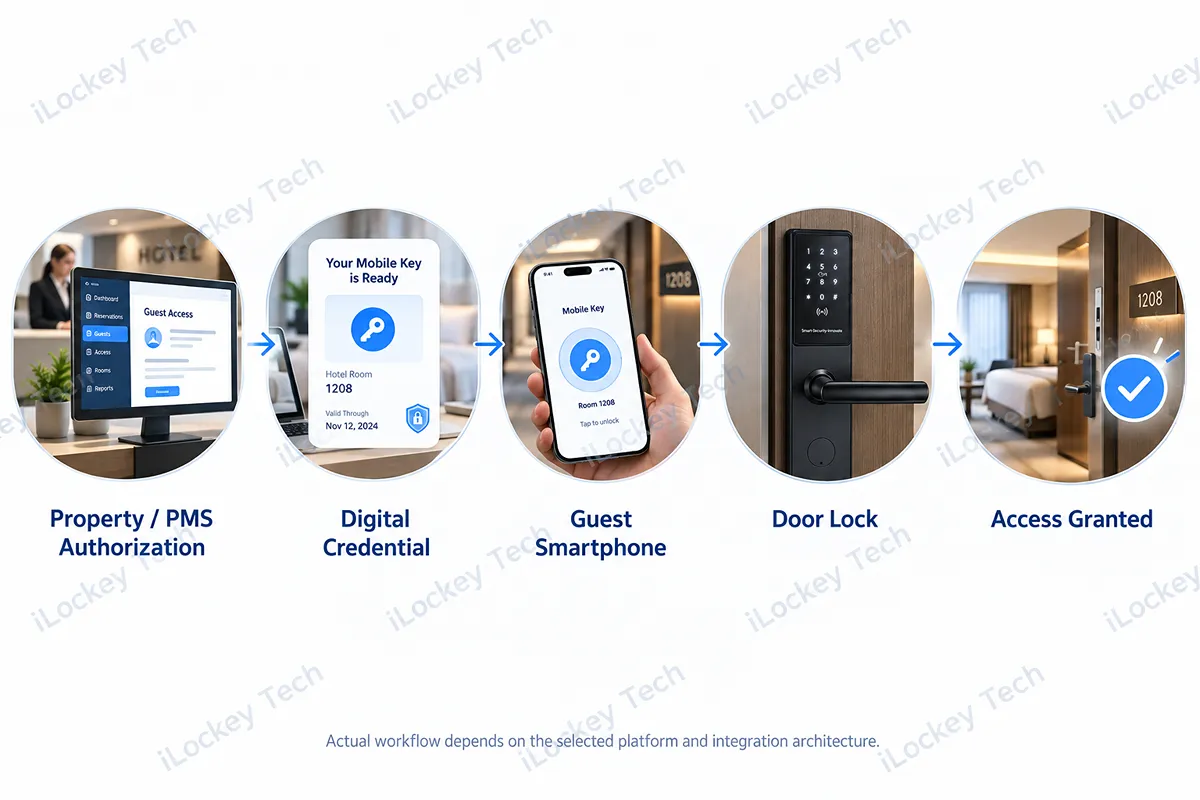
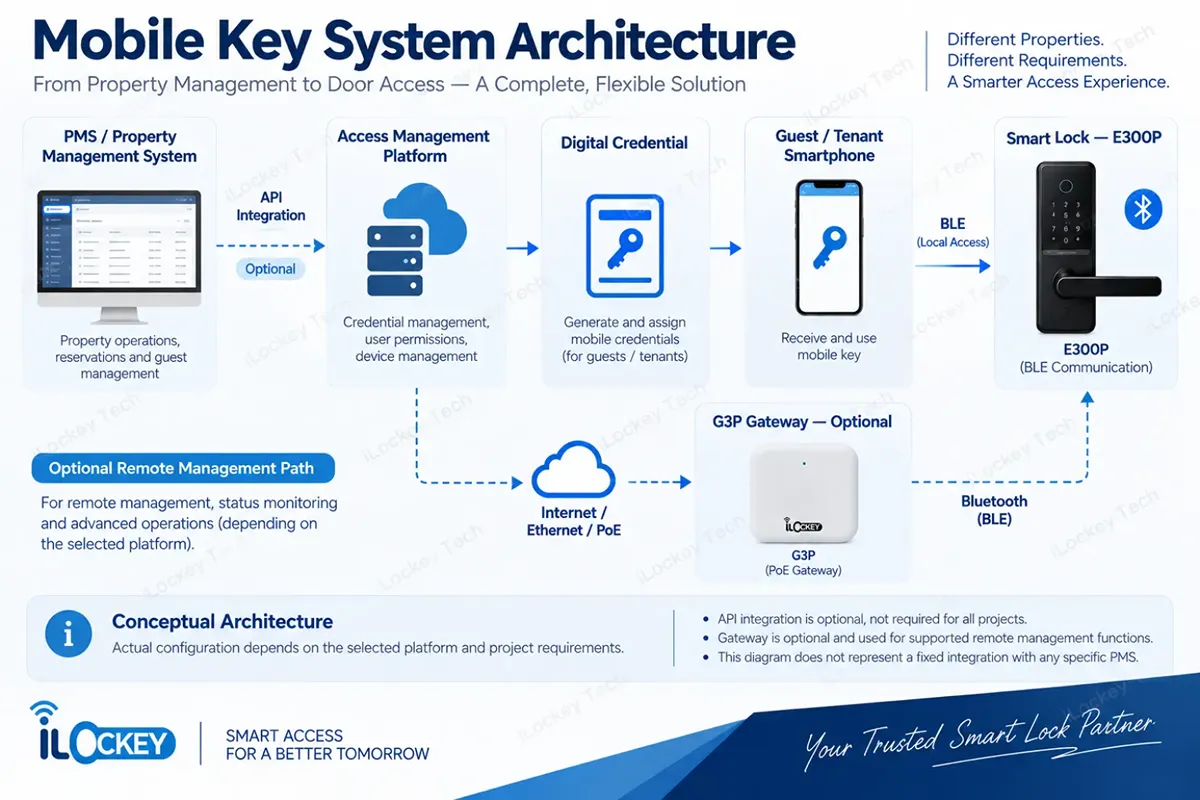
A typical hotel workflow involves five stages: property authorization, digital credential creation, delivery to the guest’s smartphone, door authentication, and access granted. In an integrated hotel environment, these stages may be linked to reservation or check-in information.
However, automatic credential delivery is not an inherent feature of every Bluetooth lock. It depends on the selected management platform, the guest-facing interface, and any required PMS integration.
2. What Changes When Access Moves to the Smartphone?
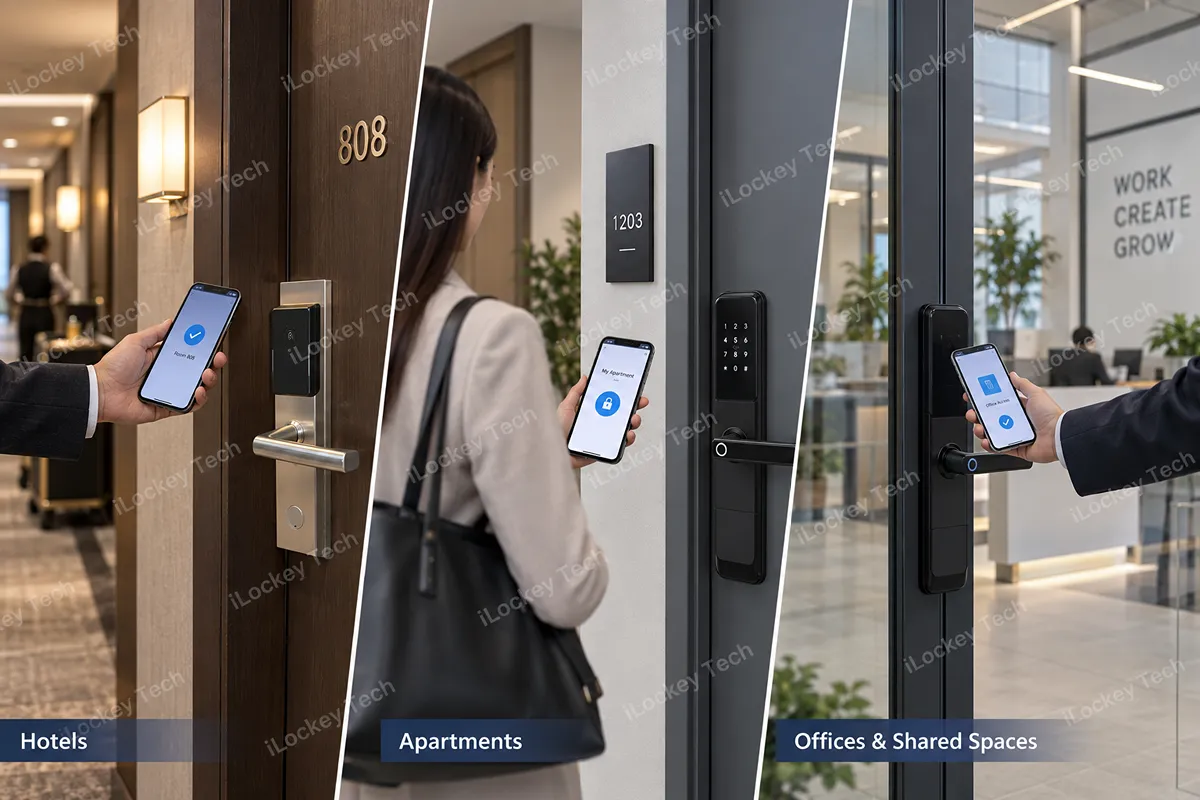
Mobile‑key access brings distinct operational shifts for hotels, apartments, and office environments, reshaping how permissions are issued and managed across each vertical.
1) Hotels: Less Manual Key Handling, More Flexible Guest Access
Hotels traditionally rely on staff to issue and replace physical room cards. A mobile credential offers another way to handle that process, particularly when digital check-in is already part of the guest journey.
A guest may receive a valid credential after completing required check-in steps and use the phone at the assigned room. When that credential expires, room access ends according to the platform’s rules. The operational opportunity is fewer manual access handovers—not an automatic elimination of the front desk or physical backup cards.
2) Apartments: Managing Access Throughout the Tenancy
Apartment operators manage permissions across move-ins, move-outs, maintenance visits, and ongoing tenancies. A mobile access platform may help administrators assign time-limited credentials and manage access without collecting every physical key.
For multi-property operators, software organization matters as much as the individual lock. Buyers should verify how buildings, units, administrators, and residents are grouped and managed.
3) Offices and Shared Spaces: Different Users, Different Permissions
Employees, contractors, cleaners, and visitors often require different access periods. Mobile credentials can support these workflows when the chosen management platform provides the appropriate permission controls.
The commercial value of mobile access is not simply replacing a card. It is managing access according to the property’s actual operating requirements.
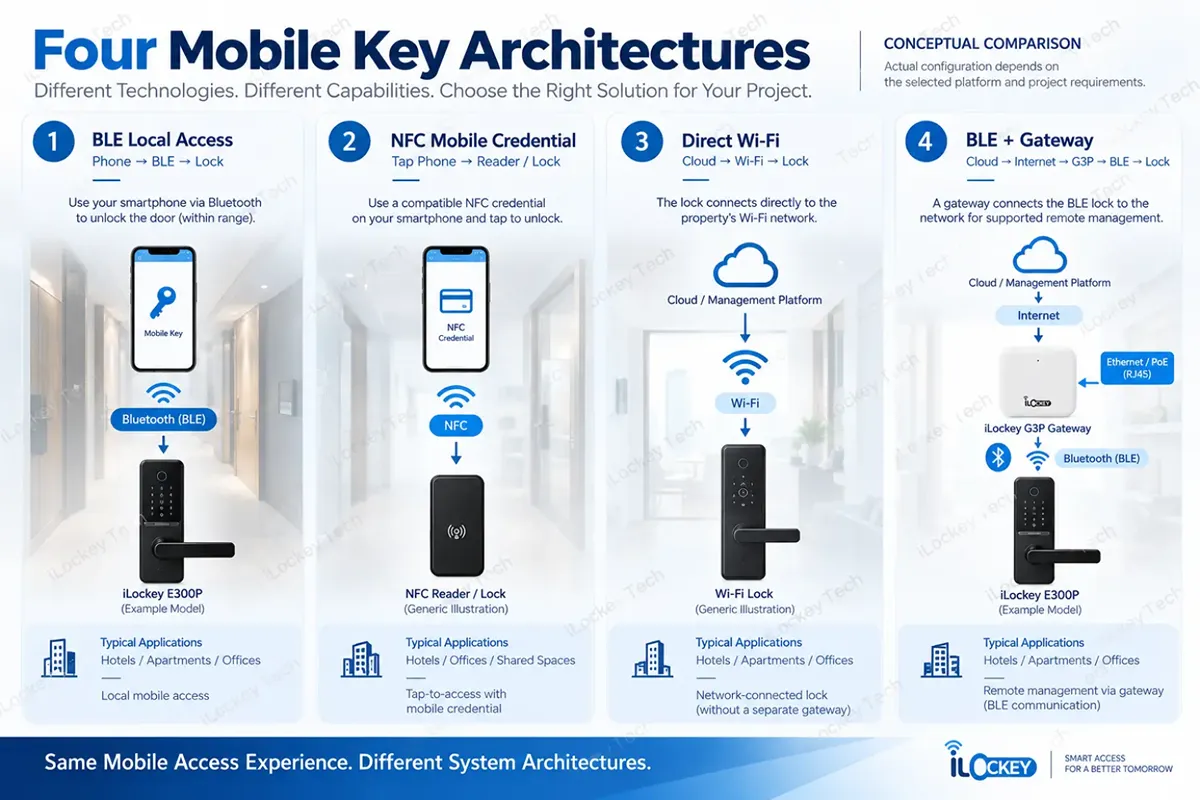
3. BLE, NFC, or Wi-Fi: Which Architecture Do You Need?
Mobile key access, remote unlocking, and internet connectivity are related—but they are not interchangeable. Buyers should establish which functions must work at the door and which must work from another location.
1) Bluetooth (BLE): Local Smartphone-to-Lock Access
With BLE, a nearby smartphone communicates directly with a compatible lock. The lock may not need an active internet connection for local opening if the required credential has already been issued and the platform supports local authentication.
Credential issuance, account management, and synchronization may still require internet access. Ask which part of the workflow remains available when the phone or door-side network is offline.
2) NFC: Tap-to-Access With a Compatible Mobile Credential
NFC lets a smartphone interact with a compatible reader at close range, but a lock that reads a physical 13.56 MHz card does not automatically support smartphone NFC credentials.
Operating system permissions, mobile credential technology, reader hardware, and the access platform must be compatible. Any wallet or smartphone-NFC requirement should therefore be verified for the exact product and system.
3) Direct Wi-Fi: Network Connectivity at the Lock
A direct Wi-Fi lock joins the property’s wireless network without a separate BLE gateway. This introduces different considerations for coverage, power consumption, reconnection behavior, and maintenance.
Buyers should verify which functions require cloud connectivity and how a network outage affects door access and management.
4) BLE + Gateway: Adding a Remote Management Path
A gateway connects a BLE lock to the network while Bluetooth remains the lock-to-gateway communication method. In the iLockey TTLock G3P PoE gateway configuration, the gateway uses wired Ethernet/PoE connectivity and communicates with compatible locks via Bluetooth.
Gateway placement requires building-level planning. Walls, corridors, metal doors, and actual Bluetooth conditions affect usable coverage. A published device maximum is not a guaranteed door count at every site.
| Architecture | Door-side communication | Project consideration |
| BLE local | Phone → BLE → lock | Offline credential behavior and user journey |
| NFC mobile credential | Phone taps compatible reader | Phone, credential, and reader compatibility |
| Direct Wi-Fi | Lock → Wi-Fi network | Coverage, power, and reconnection |
| BLE + gateway | Lock → BLE → gateway → network | Gateway placement and remote-management requirements |
4. Before You Buy the Lock, Make Sure the System Works
Selecting smart locks goes far beyond hardware specifications; overall system compatibility, user experience and integration capacity determine real‑world project success.
1) Can the Lock Fit Your Existing Doors?
For retrofit projects, confirm door thickness, material, handing, mortise type, backset, center distance, and existing preparation holes. Fire-door applications may require separate verification of the complete door and hardware configuration. Software cannot compensate for an incompatible door.
2) How Will Guests Receive Their Mobile Keys?
Will users need an app or another supported interface? Must a credential be activated online before arrival? Can a valid credential work locally when a phone has no mobile internet? The user journey should fit the property’s operating model—not only the supplier’s demonstration.
3) What Can the Management Platform Actually Do?
Ask about credential issuance, validity, revocation, room and user organization, administrator roles, supported access records, and batch operations. For a multi-property deployment, test management workflows at the expected scale.
4) Can It Work With Your Existing PMS?
A hotel may want credential issuance linked to reservation, check-in, room assignment, and checkout events. That workflow typically involves the business system, an access platform, a guest-facing interface, and compatible lock communication—not the PMS directly opening every door.
Confirm the API or SDK available for the selected platform, the functions it exposes, integration responsibilities, and any service or development costs. iLockey’s API, SDK, PMS, and third-party integration capabilities must be confirmed against the chosen product and software architecture rather than assumed across its full product range.
5. What Happens When the Phone or Network Is Unavailable?
Real-world deployments need exception handling. A guest may lose a phone, arrive without mobile internet, or have an expired credential. A gateway may lose power or network connectivity.
Depending on the selected system, a previously issued BLE credential may still work locally during a gateway outage while supported remote functions become unavailable. Buyers should test that exact behavior and define a fallback process using the access methods available on the selected model, such as RFID, PIN, or mechanical key where supported.
For a hotel, backup access is part of the operating procedure—not a feature to consider only after installation.
6. What Should a Mobile Key Project Really Cost?
The lock unit price is only one part of the investment. Remote management may require network infrastructure; PMS integration may require development and testing; retrofit installation may differ considerably from a new-build project.
Total Project Cost = Lock Hardware + Gateway / Network Infrastructure + Software and Integration + Installation and Training + Maintenance and Support.
Rather than comparing stand-alone hardware prices, request a quotation for the complete operating workflow and the components it actually requires.
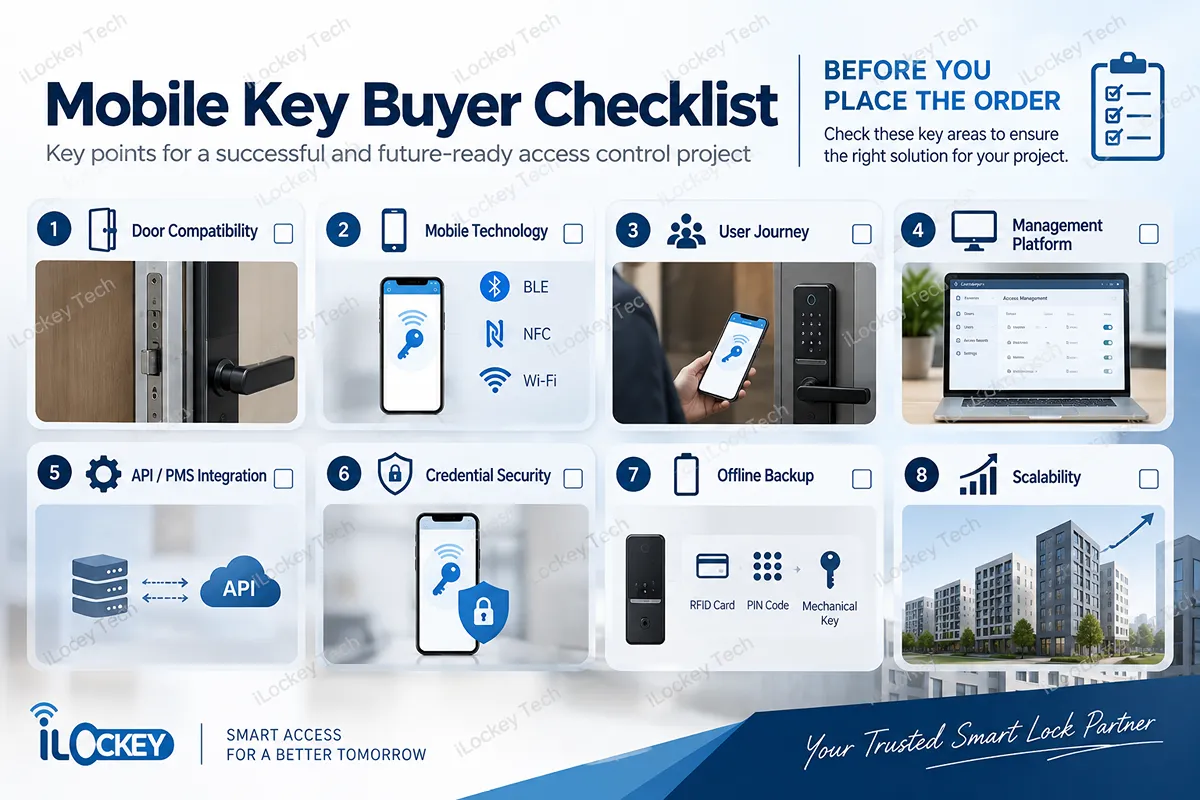
7. Mobile Key Buyer Checklist
| Check | What to confirm |
| Door compatibility | Does the selected lock fit the actual door and mortise? |
| Mobile technology | Which mobile-access methods does this specific model support? |
| User journey | How do guests, tenants, or staff receive credentials? |
| Management platform | How are users, doors, properties, and permissions organized? |
| API / PMS integration | What interface exists, and who develops the integration? |
| Credential security | How are credentials protected, limited, and revoked? |
| Offline backup | What happens during phone, internet, or gateway failure? |
| Scalability | Can the platform support the anticipated number of doors and sites? |
Compare suppliers by verified project requirements—not by the number of features on a product sheet.
8. Why a Pilot Deployment Matters
A product demonstration shows that a lock can open. A pilot shows whether the whole workflow functions in the intended environment.
For a hotel, test credential issuance, guest activation, room opening, checkout expiry, fallback access, and staff administration. For an apartment, include resident turnover, service personnel, multi-door administration, and the actual wireless environment.
A representative pilot can expose door-preparation issues, network assumptions, or integration gaps before these problems are repeated across hundreds of rooms.
9. Mobile Key Smart Locks FAQs
The following are some common questions about Mobile Key Smart Locks.
1) Does a mobile key smart lock require Wi-Fi?
Not necessarily. BLE can support local phone-to-lock communication, while credential delivery and remote management may still need internet access depending on the platform.
2) Do hotel guests need to download an app?
It depends on the selected system. Verify the exact guest interface and activation steps before procurement.
3) Can mobile keys replace hotel RFID cards completely?
They may reduce reliance on cards, but the appropriate mix depends on guest needs, operating procedures, and the property’s backup strategy.
4) Is a gateway necessary for Bluetooth mobile keys?
Not for every local BLE opening operation. A gateway may be necessary for supported cloud-based remote functions.
5) Can a mobile key system integrate with existing hotel PMS software?
Integration is platform-specific. Verify the existing PMS, desired functions, available interfaces, and who is responsible for implementation.
6) What happens when a mobile credential expires?
Access should follow the configured validity rules. Confirm the platform’s actual expiration, revocation, and synchronization behavior in a pilot.
Request a Project Assessment: Choose the workflow. Verify the system. Then select the lock.
10. Conclusion
Mobile key technology gives hotels, apartments, and commercial properties new options for issuing and managing access. But project value comes from the complete workflow—not the number of wireless terms in a specification sheet.
Define how credentials reach users, how administrators manage permissions, which functions depend on connectivity, and whether the system must integrate with existing property software. Then verify hardware compatibility, total cost, and backup procedures.
Planning a hotel upgrade, serviced-apartment project, or commercial mobile-access deployment? Share your door photos and dimensions, project quantity, preferred mobile access method, remote-management requirements, and existing PMS or management platform with iLockey.
Our team can help evaluate suitable hardware and communication architectures for the selected product platform and plan sample or pilot testing before mass procurement.