Managing apartment access is no longer simply about replacing a mechanical key with a password. For landlords, serviced-apartment operators and property management companies, the real value of a smart lock lies in simplifying tenant turnover, staff access, maintenance visits and multi-property management.
A suitable apartment smart lock should improve daily operations without creating new problems in installation, connectivity or software management. This guide from iLockey explains how apartment smart locks work, where they are most useful and what property operators should consider before selecting a system based on our 10+ years of experience.
1. What Is an Apartment Smart Lock?
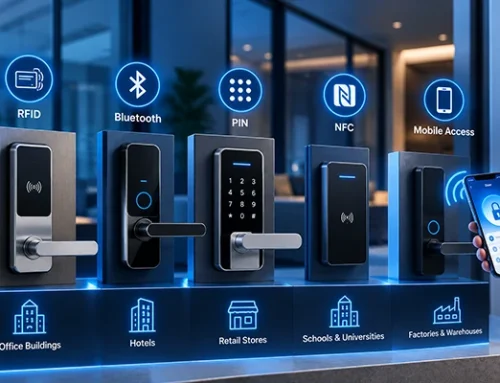
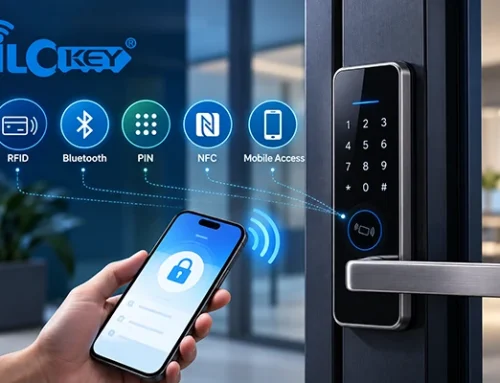
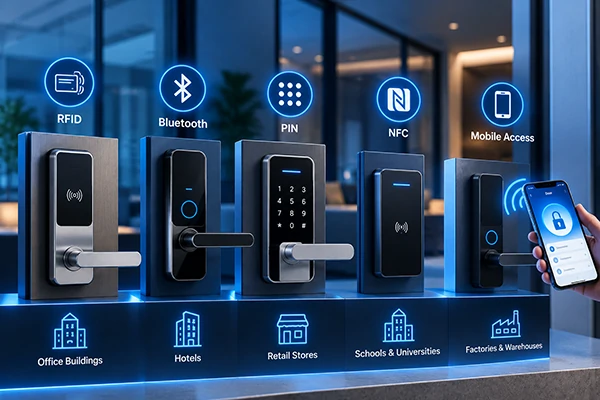
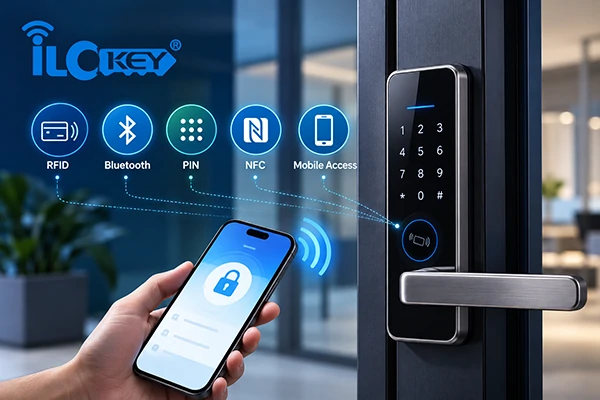
An apartment smart lock is an electronic locking system designed for rental properties, serviced apartments, residential buildings and other professionally managed accommodation. Depending on the lock model and software platform, users may open the door using:
- A PIN code
- A mobile app
- Bluetooth
- An RFID card
- A fingerprint
- A mechanical key
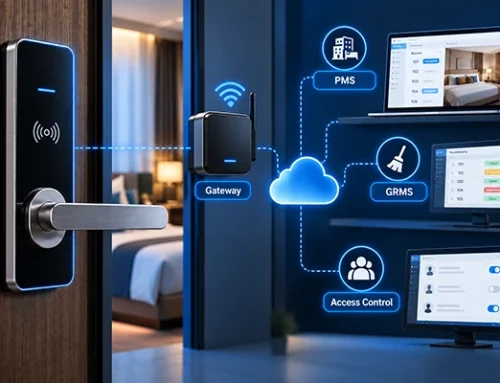
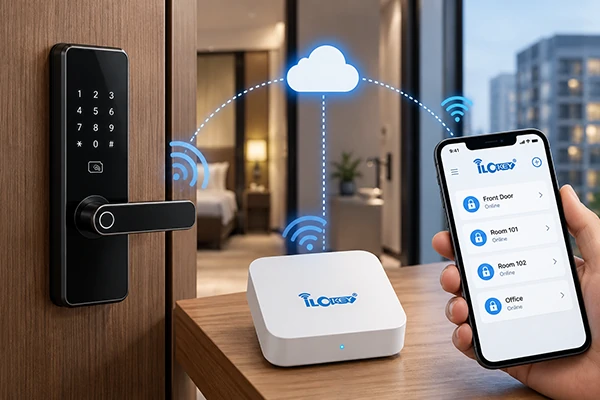
- Remote authorisation through a gateway
The main difference between an apartment smart lock and a standard residential smart lock is the management structure. A normal home lock may only need to serve one family. An apartment project may need to manage hundreds of tenants, cleaners, maintenance workers and property managers across multiple buildings or locations. The system must therefore support controlled access, time-limited credentials, operation records and different administrator roles.
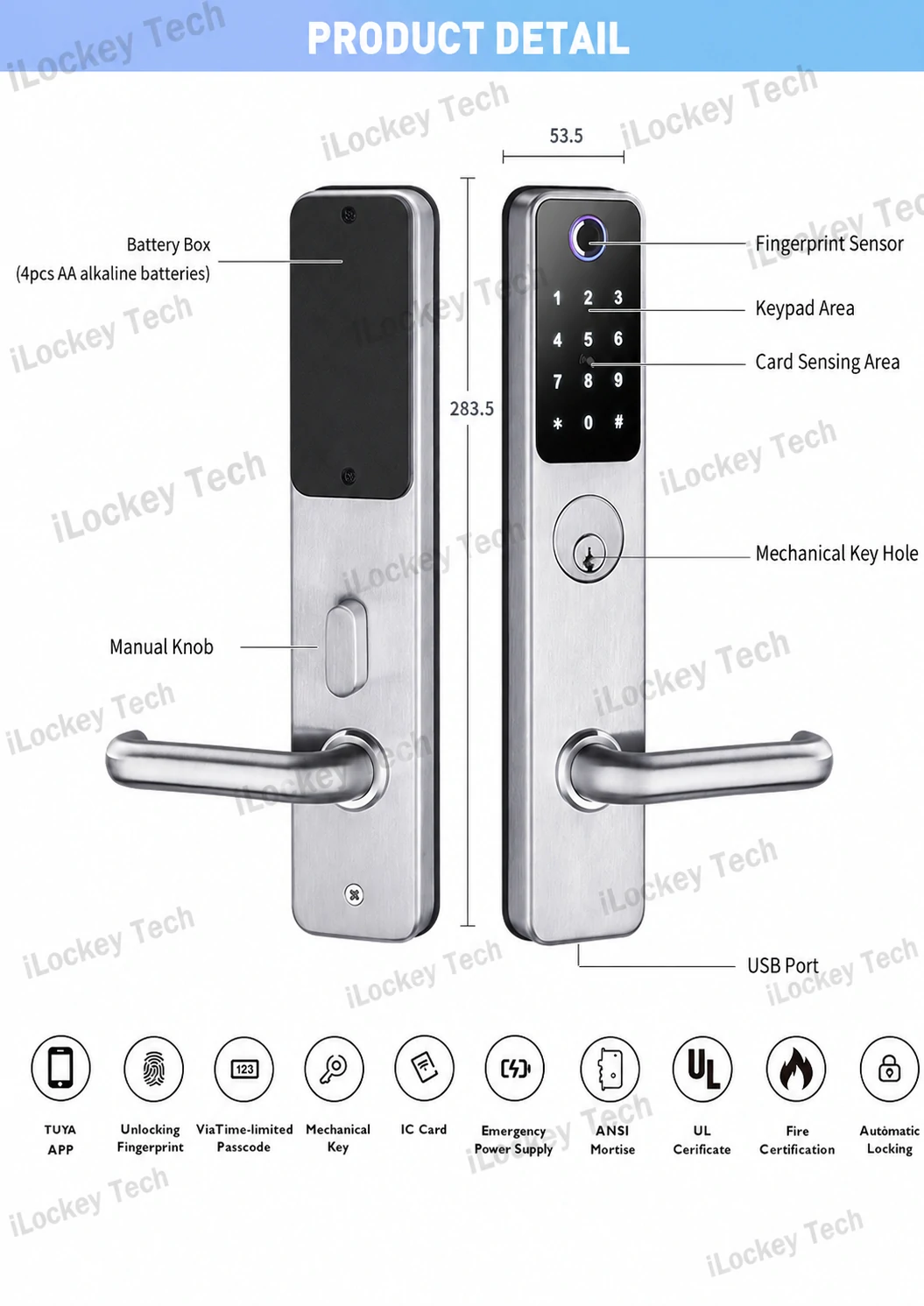
“Available functions depend on the selected model.”
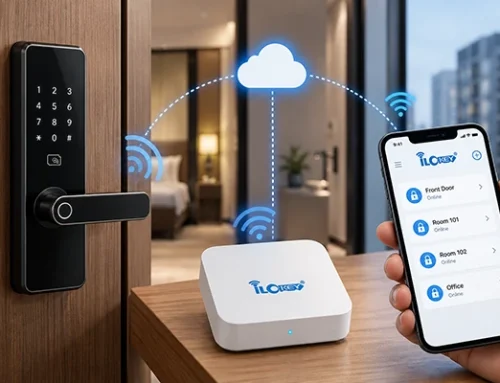
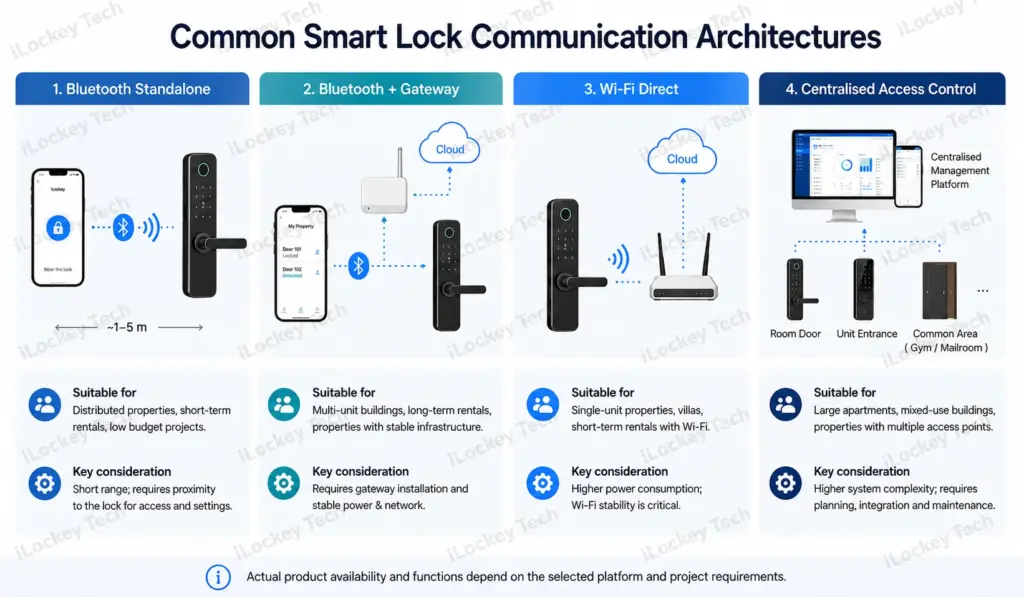
We list a table for Common Communication Options; different smart lock systems use different communication methods. The correct choice depends on the property structure, remote-management needs and available network conditions.
| Solution | Main advantage | Points to consider | Typical application |
| Bluetooth lock | Low power consumption and simple installation | Remote functions may require a gateway | Individual apartments and distributed rental properties |
| Bluetooth lock with gateway | Remote management, record synchronisation and status updates | Gateway coverage must be planned | Apartment buildings and serviced apartments |
| Wi-Fi lock | Direct internet connection | Higher power consumption and greater dependence on network stability | Small properties with reliable Wi-Fi |
| RFID or hotel-style system | Efficient card management and centralised operation | Requires compatible software and card-issuing equipment | Serviced apartments and hotel apartments |
| Integrated access-control system | Can manage room doors, entrances and common areas | Requires project-level planning | Entire residential buildings and mixed-use properties |
Actual functions depend on the selected lock, software platform and project configuration.
2. Why Use Smart Locks in Apartment Properties?
At iLockey, we’ve been in the property access business since 2008, and if there’s one thing we’ve seen time and again, it’s that the benefits of smart locks go far beyond the hardware—they fundamentally transform how properties are managed. Here are the real-world advantages we’ve observed.
1) Reduce Physical Key Handovers
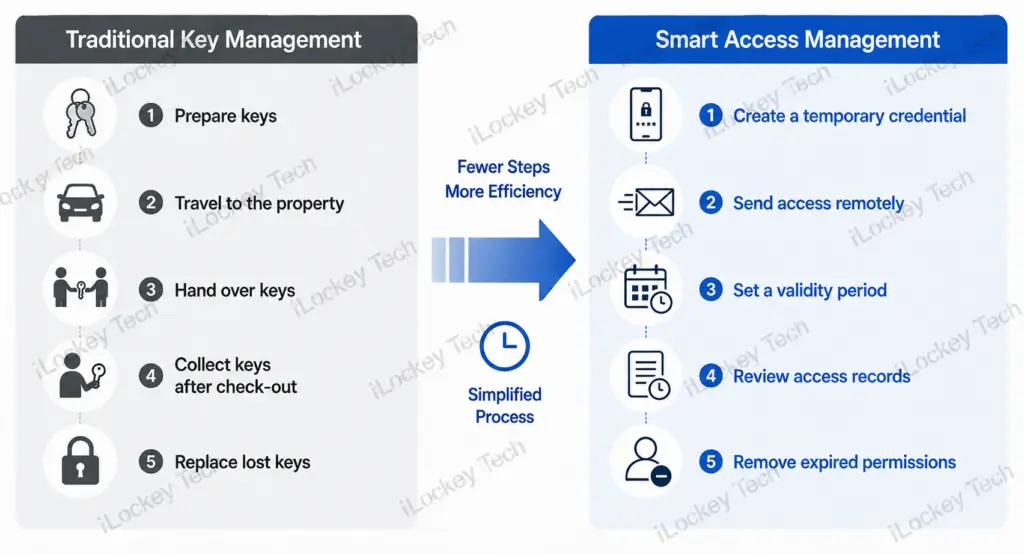
Traditional key management requires someone to prepare, deliver, collect and store keys. This becomes inefficient when tenants check in late, move out unexpectedly or require access outside office hours.
With a smart lock, the operator can issue a time-limited PIN code or mobile credential before arrival. Once the authorised period ends, the credential can expire automatically according to the settings supported by the system.
This reduces face-to-face key handovers and makes self-check-in easier.
2) Manage Tenants, Cleaners and Maintenance Staff Separately
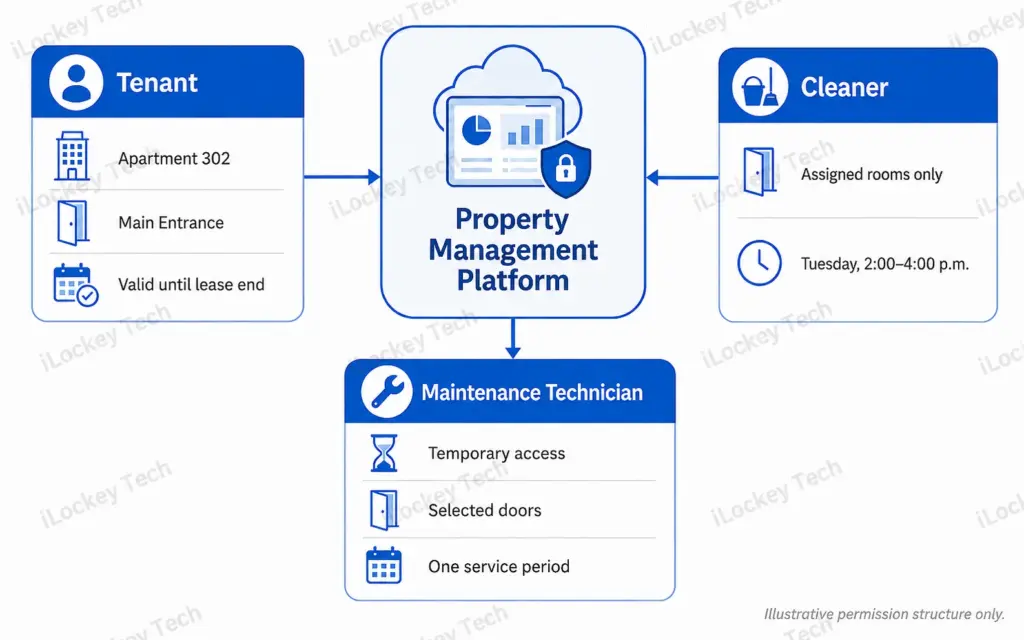
Different users should not receive the same level of access. A tenant may need access to one apartment and selected common areas. A cleaner may only need access during a scheduled service period. A maintenance technician may require temporary access to several rooms.
A suitable system should allow permissions to be limited by:
- Door
- Building
- Floor
- Date
- Time period
- User role
- Credential type
For example, a cleaner can be given access between 2:00 p.m. and 4:00 p.m. on a specific day instead of receiving a permanent key.
3) Improve Security and Traceability
Mechanical keys can be lost, copied or retained after a tenant moves out. Smart credentials can be deleted, suspended or configured with an expiry time. The system may also record events such as PIN-code access, card access, mobile unlocking and invalid attempts.
For remotely connected projects, selected records and alerts may be synchronised to the management platform through a gateway. Smart locks do not eliminate every security risk, but they provide better control and traceability than unmanaged physical keys.
4) Manage More Properties with Fewer Site Visits
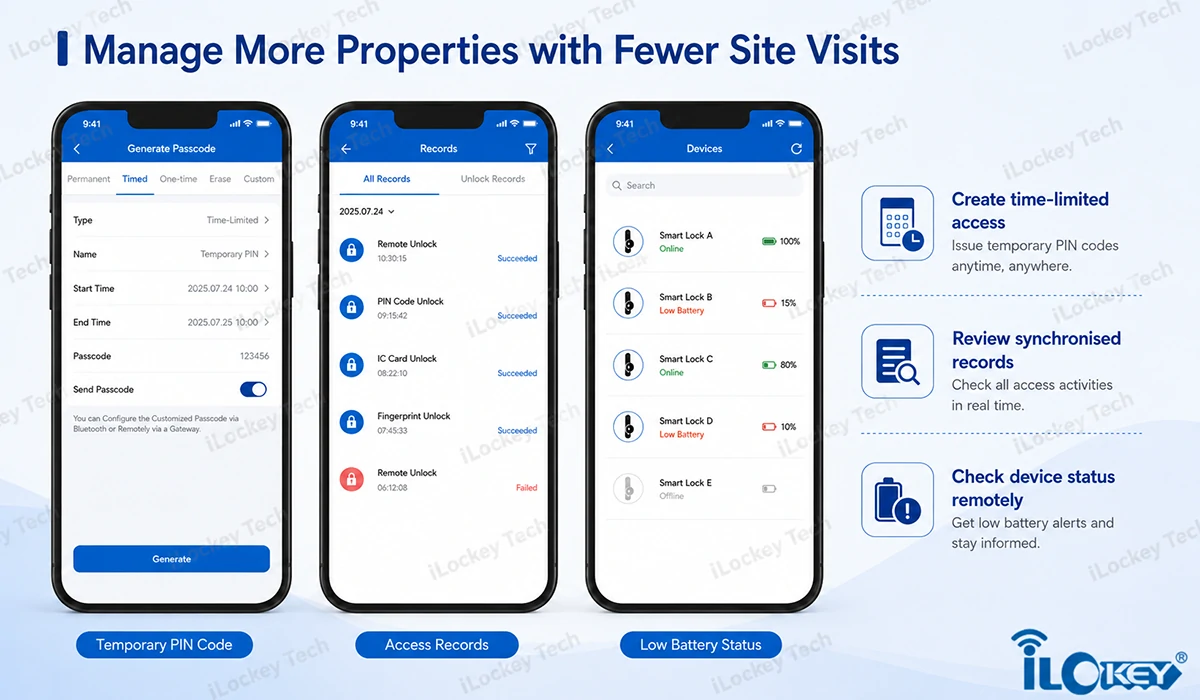
For operators managing apartments in different buildings or areas, many routine tasks do not require someone to visit the property. Depending on the system configuration, staff may be able to:
- Issue temporary credentials
- Change access periods
- Review synchronised opening records
- Check low-battery information
- Authorise maintenance access
- Remove former tenant permissions
- Manage several locks under one account
This can reduce unnecessary travel and improve response times.
3. Main Apartment Smart Lock Applications
Over the years, we’ve seen smart locks deployed across a wide range of apartment scenarios—each with its own unique access requirements. Here are the main ones we encounter.
1) Long-Term Rental Apartments
In long-term rental projects, access permissions should match the tenant’s lease period. Time-limited PIN codes and mobile credentials can be configured to expire at a specified date and time. Some systems may also support validity periods for cards or fingerprints.
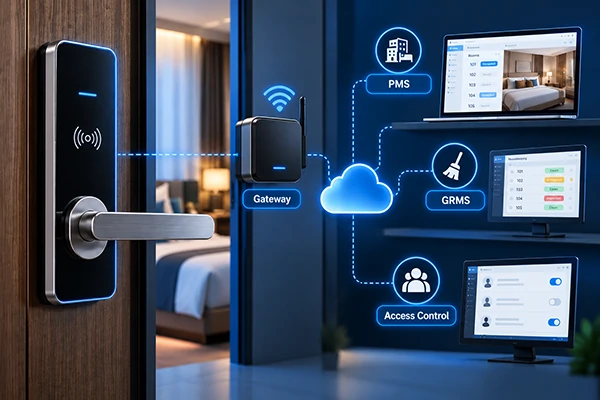
Automatic synchronisation with an electronic lease requires compatible API or SDK integration between the smart lock platform and the property management system. The integration should be evaluated individually because different platforms use different data structures and permission rules.
2) Short-Term Rentals and Serviced Apartments
Short-term rental operators often need to manage frequent check-ins without keeping reception staff at every location.
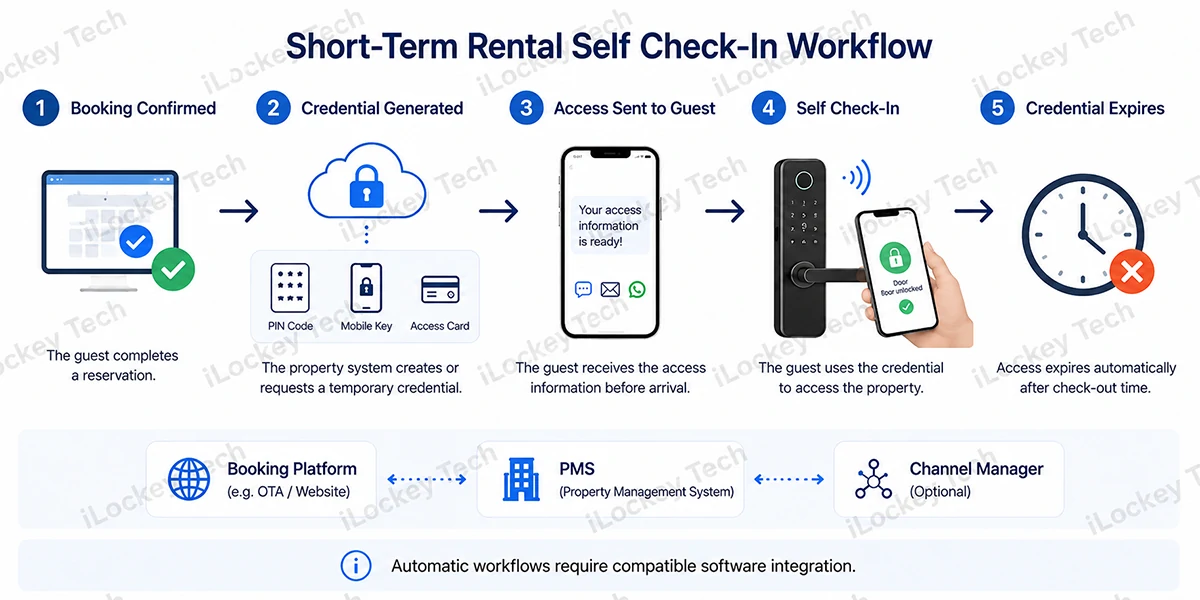
A typical process is:
- The reservation is confirmed.
- The property system creates or requests a temporary credential.
- The guest receives the access information before arrival.
- The credential remains valid during the booked period.
- Access expires after check-out.
This workflow may be achieved through a compatible property management system, channel manager or customised API connection. It should not be assumed that every lock connects directly to every booking platform. Integration depends on the selected software and the technical interfaces available on both sides.
3) Distributed Rental Properties
Distributed properties may be located across several neighbourhoods or cities. In this situation, the operator needs a system that can organise locks by project, building, floor or room while allowing different employees to manage assigned properties.
Bluetooth locks are often suitable for distributed properties because they do not require each lock to remain continuously connected to the internet. Where real-time remote control is required, operators may consider a compatible gateway or another remote communication solution.
4) Entrances and Common Areas
Apartment access is not limited to the room door. The same project may also include:
- Main entrances
- Floor entrances
- Parcel rooms
- Fitness rooms
- Laundry rooms
- Meeting rooms
- Parking areas
- Management offices
A tenant credential may be authorised for the apartment and selected common areas. Staff credentials may cover a wider group of doors. Room locks, access controllers, elevator controllers and management software must use compatible credential and permission logic. Common-area access should therefore be planned before equipment is ordered.
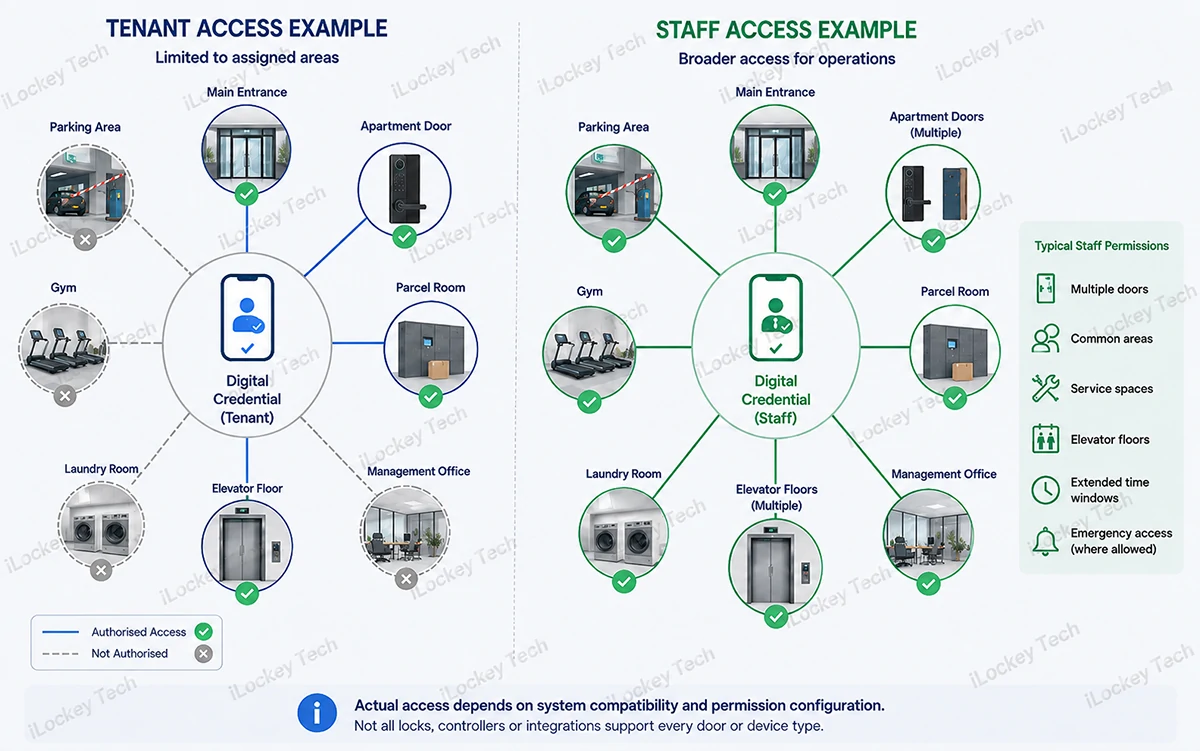
5) Staff and Service-Provider Access
Cleaners, contractors and maintenance teams usually need limited rather than permanent access. Depending on the platform, access may be configured for:
- One specific period
- A recurring weekly schedule
- A limited number of uses
- One or several assigned doors
- A temporary project period
Invalid attempts can normally be recorded by the lock. Real-time remote notification depends on whether the lock is connected to a gateway and whether the platform supports that alert type.
4. How to Choose an Apartment Smart Lock?
iLockey has more than a decade in the smart lock industry, we’ve developed a proven selection framework that goes beyond specs and price tags—it starts with asking the right questions about the property itself. Here’s our step-by-step approach.
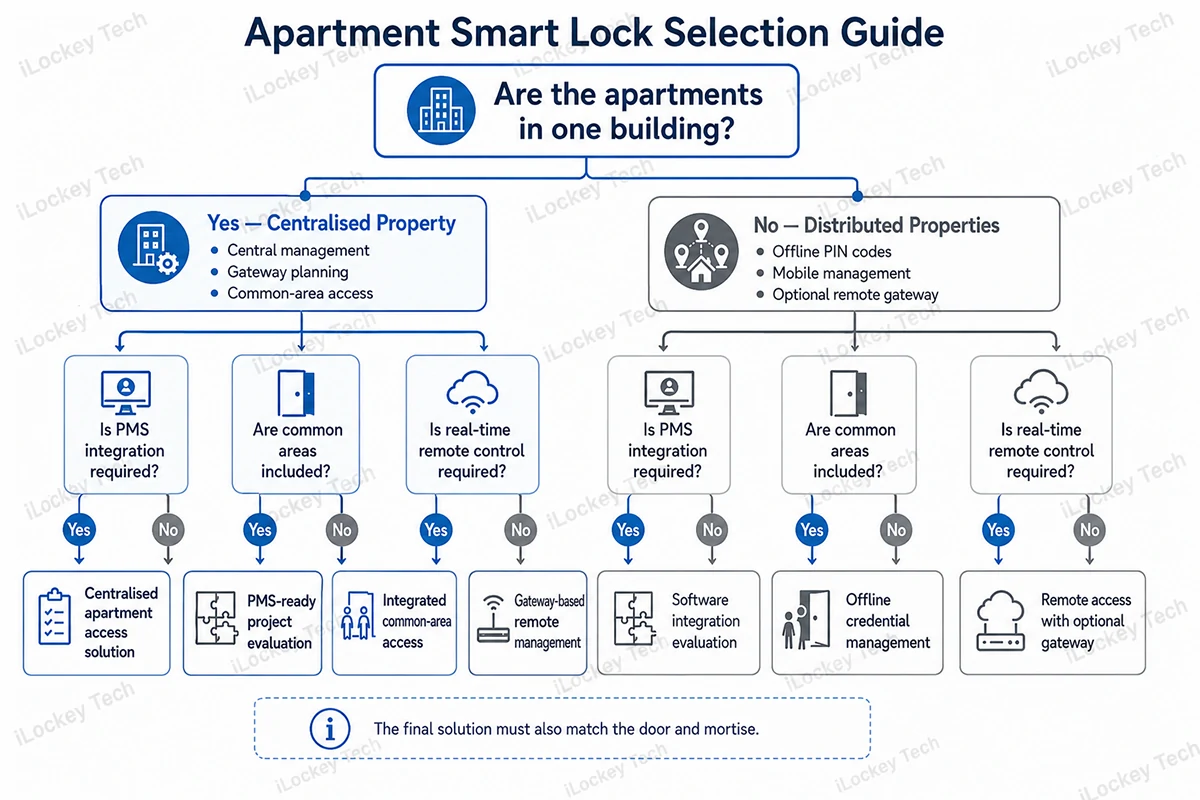
1) Start with the Property Structure
The first question should not be: Which lock looks best? It should be: How are the properties distributed and managed?
- A small group of apartments in one building may benefit from gateways and centralised remote management.
- A few apartments spread across different locations may be better suited to Bluetooth locks with offline credentials and optional gateways.
- A large serviced-apartment project may require integration between room locks, common-area access, elevators and a property management system.
2) Select Suitable Unlocking Methods
Not every property needs every unlocking method. A practical combination may include:
- PIN codes for tenants and short-term guests
- Mobile credentials for operators and regular users
- RFID cards for serviced apartments
- Fingerprints for selected residential applications
- Mechanical keys for emergency access
- Remote unlocking for authorised staff
More unlocking methods do not automatically create a better product. The right combination depends on the users, operating model and support capacity. For example, fingerprint access may be convenient for long-term residents but less useful for a short-term rental with frequent guest turnover.
3) Review the Management Platform
For a professional apartment project, management software is as important as the lock. Key questions include:
- Can locks be grouped by project, building, floor and room?
- Can different employees receive different administrator permissions?
- Can credentials be created in batches?
- Can opening records be exported?
- Can low-battery information be viewed remotely?
- Is there an API or SDK?
- Which functions require a gateway?
- Can room locks and public-area access be managed together?
- Are there software subscription fees?
These questions should be confirmed for the specific product platform rather than assumed across all models.
4) Check PMS and Software Integration Requirements
Property operators may already use a PMS, rental management system or self-developed platform. Before selecting a lock, both sides should define:
- Which system creates the tenant or booking record
- Which system generates the credential
- How check-in and check-out times are transferred
- How room changes are handled
- How expired credentials are removed
- Whether opening records must be returned
- Which party is responsible for software development
- Whether the API includes recurring fees
A successful integration depends on cooperation between the lock platform, property software provider and project operator.
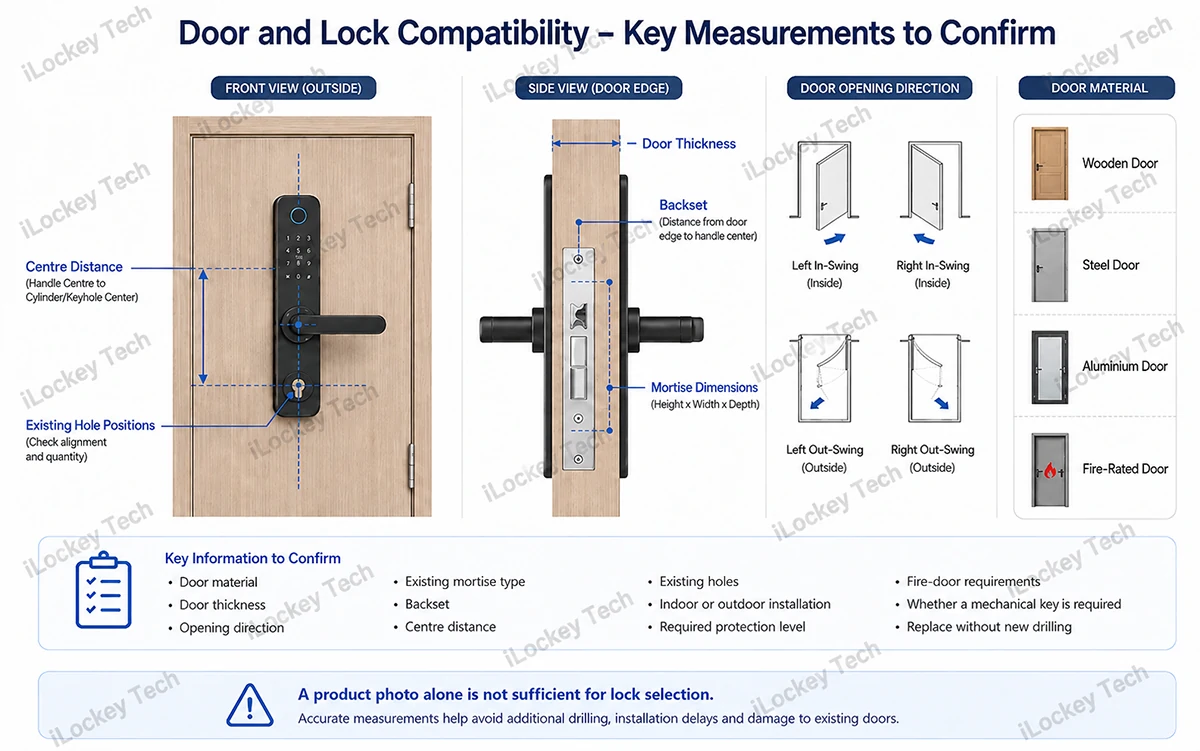
5) Confirm Door and Installation Compatibility
A smart lock cannot be selected only from a photograph. Before quotation or production, the supplier should confirm:
- Door material
- Door thickness
- Opening direction
- Existing mortise type
- Backset
- Centre distance
- Existing holes
- Indoor or outdoor installation
- Required protection level
- Fire-door requirements
- Whether a mechanical key is required
- Whether the original lock must be replaced without new drilling
For replacement projects, accurate measurements can prevent additional drilling, installation delays and damage to existing doors.
6) Evaluate Battery Life and Offline Operation
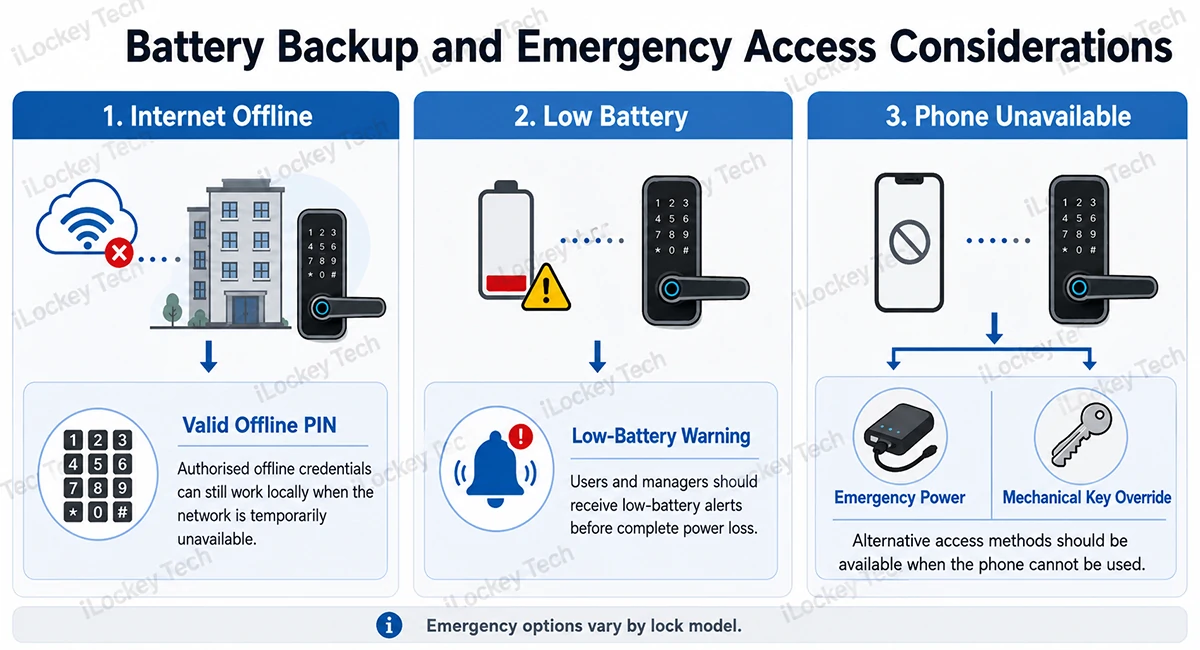
Battery life is affected by communication method, usage frequency, motor load, battery quality and operating temperature. Instead of relying only on a general battery-life claim, buyers should ask:
- What battery type does the lock use?
- How is low battery indicated?
- Can battery status be checked remotely?
- Is emergency external power available?
- Is there a mechanical override?
- Can valid credentials still work when the internet is unavailable?
- How many access records can be stored locally?
A reliable apartment lock should continue to verify authorised offline credentials even when the building network is temporarily unavailable.
7) Match the Solution to the Project Size
Here we have summarised a table for your reference.
| Project type | Suggested starting point |
| A few distributed apartments | Bluetooth lock with PIN code and mobile management |
| Small serviced-apartment project | Bluetooth locks with selected gateways |
| Entire apartment building | Central management, gateways and common-area access planning |
| Hotel-style serviced residence | RFID or Bluetooth hotel platform with PMS evaluation |
| Multi-city rental portfolio | Cloud-based account structure with clear regional administrator permissions |
The final configuration should be based on actual doors, user groups, network conditions and management requirements.
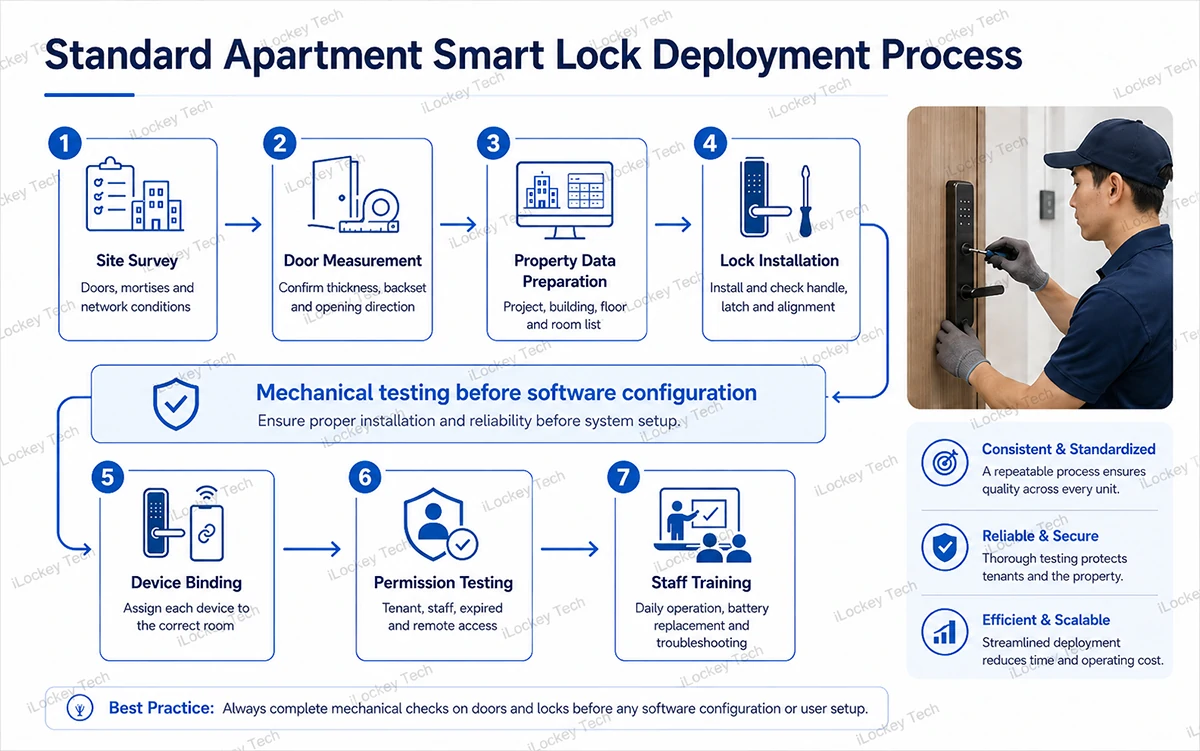
5. Typical Deployment Process
As a smart lock manufacturer and supplier, we know that even the best hardware can underperform if the deployment isn’t done right. That’s why we’ve developed a standardized process—tested and refined across countless apartment projects—to minimize binding errors and installation issues from the very start. Here’s how we guide our clients through it.
Step 1: Survey the Property
Record the number of room doors, public doors, door types, existing mortises and network conditions. For Bluetooth gateways, actual coverage depends on walls, metal doors, electrical interference and building layout. In complex buildings, conservative placement within approximately eight metres of the locks is often more reliable than relying on the maximum open-space distance.
Step 2: Build the Property Structure
Prepare a room list showing the project, building, floor and room number. For large projects, locks and rooms should be imported or prepared in batches wherever the selected platform allows it.
Step 3: Install and Mechanically Test Each Lock
After installation, check:
- Handle movement
- Latch and deadbolt movement
- Door alignment
- Mechanical key operation
- Emergency power
- Door-closing condition
Software testing should only begin after the mechanical installation is stable.
Step 4: Bind Each Lock to the Correct Room
The installer uses the designated mobile application or project management tool to assign each lock to the correct room. A room-lock binding record should be maintained to avoid assigning the wrong device to the wrong apartment.
Step 5: Configure Users and Permission Rules
Set up administrator roles, tenant credentials, staff schedules, temporary access rules and alert settings.
Step 6: Test a Complete Access Cycle
Before handover, test:
- Tenant access
- Expired access
- Staff access
- Invalid credentials
- Low-battery warning
- Offline operation
- Remote operation where applicable
- Opening-record synchronisation
Step 7: Train the Operating Team
Property staff should understand how to create, modify and cancel credentials, replace batteries, handle lockouts and identify whether a problem is mechanical, electronic or network-related.
Clear training materials and operating procedures are especially important for projects with frequent employee turnover.
6. Typical Deployment Scenarios
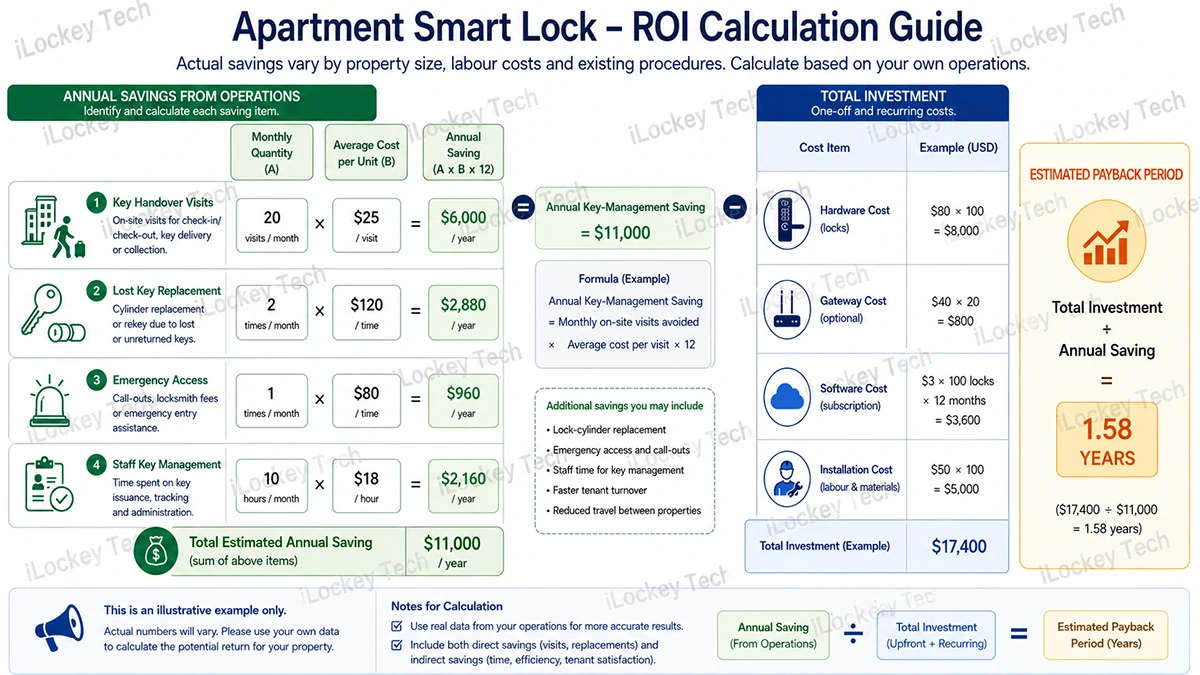
Once the deployment process is nailed down, the next question is: where does it all play out? As a manufacturer, we’ve supplied locks to everything from high-rise rentals to short-term vacation buildings—and each scenario comes with its own economics. We always tell our clients that actual savings will vary depending on property size, labor costs, and existing workflows. Operators shouldn’t rely on fixed percentages—instead, they should calculate potential returns based on their own operational realities.
1) Centralised Long-Term Apartment Building
A centralised project may use Bluetooth locks, gateways and controlled access for room doors and common areas. The main benefits may include:
- Fewer physical key handovers
- Faster tenant turnover
- Easier cleaner and maintenance scheduling
- Reduced lock-cylinder replacement after tenant departure
- Centralised low-battery monitoring
2) Distributed Short-Term Rental Properties
A distributed operator may use Bluetooth locks with time-limited PIN codes and optional gateways at selected locations. The main benefits may include:
- Self-check-in
- Reduced late-night key delivery
- Temporary access for cleaners
- Faster cancellation of expired credentials
- Less travel between properties
A simple return-on-investment calculation can be made as follows:
Annual key-management saving= Monthly on-site visits avoided × Average cost per visit × 12
Operators can also include lock-cylinder replacement, emergency access and staff key-management costs in the calculation.
7. Frequently Asked Questions
Over the years, we’ve heard just about every concern that can be thrown at us. Here are the questions that come up most often—along with the straight answers we’ve learned to give.
1) What Happens If the Tenant’s Phone Is Lost or Has No Power?
The tenant may use another authorised method such as a PIN code, RFID card, fingerprint or mechanical key, depending on the lock configuration.
2) Can the Lock Still Open When the Internet Is Unavailable?
Most Bluetooth apartment locks can verify valid local credentials without a continuous internet connection. Remote commands and real-time data synchronisation may be unavailable until the network or gateway connection is restored.
3) What If the Existing Door Holes Do Not Match?
The supplier should check the existing mortise, panel dimensions, backset, centre distance and door holes. In some cases, an adapter plate or new drilling may be required. Replacement models can reduce modification when the original dimensions are compatible.
4) Can Several Platforms Manage the Same Lock?
This depends on the lock firmware and software ecosystem. A lock normally operates within one designated platform. Integration with another management system may be possible through an API or SDK.
5) How Is Access Removed After a Tenant Moves Out?
Time-limited credentials can expire according to their programmed validity. Permanent credentials should be deleted or disabled by the property manager. Automatic synchronisation with lease dates requires compatible software integration.
6) How Long Do the Batteries Last?
Battery life depends on the lock model, battery type, usage frequency, communication method and environment. Low-battery warnings may appear on the lock, in the app or in the remote platform when supported.

8. Conclusion
The best apartment smart lock is not simply the model with the most features. It is the system that fits the property structure, door conditions, tenant turnover, staff workflow and existing management software. Before selecting a solution, operators should confirm three areas:
- Whether the hardware fits the doors.
- Whether the software supports the required permission structure.
- Whether remote management and integration functions are available in the selected platform.
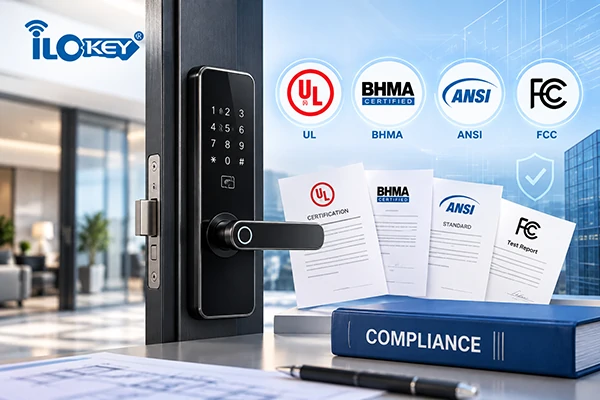
With core team members bringing over 20 years of experience in the smart lock industry, iLockey provides OEM, ODM and project-based access solutions for apartments, serviced residences and hospitality properties. Project recommendations are made according to actual door specifications, management requirements, access methods and software integration needs.