When you compare smart locks, connectivity is only one part of the decision. A solution that works well for a private villa may not be the right architecture for a hotel, student residence or apartment building with hundreds of doors.
A direct Wi-Fi smart lock connects to a local router without a separate Bluetooth gateway. For compatible products, this can simplify remote access management in homes, villas, small rental units and other light-duty projects. It can also allow the lock to participate in a compatible smart home ecosystem, where an access event may trigger lighting, security or other connected devices.
These two application directions are the main commercial value of Tuya-based direct Wi-Fi residential locks: standalone access management for small applications and integration into a wider smart home package. They should not automatically be positioned as hotel PMS locks or as replacements for every centralized access control system.
This guide explains how direct Wi-Fi smart locks work based on iLockey‘s experience, which projects they suit, how they differ from Bluetooth locks with gateways, and what B2B buyers should confirm before selecting a product or supplier.
1. What Is a Direct Wi-Fi Smart Lock?
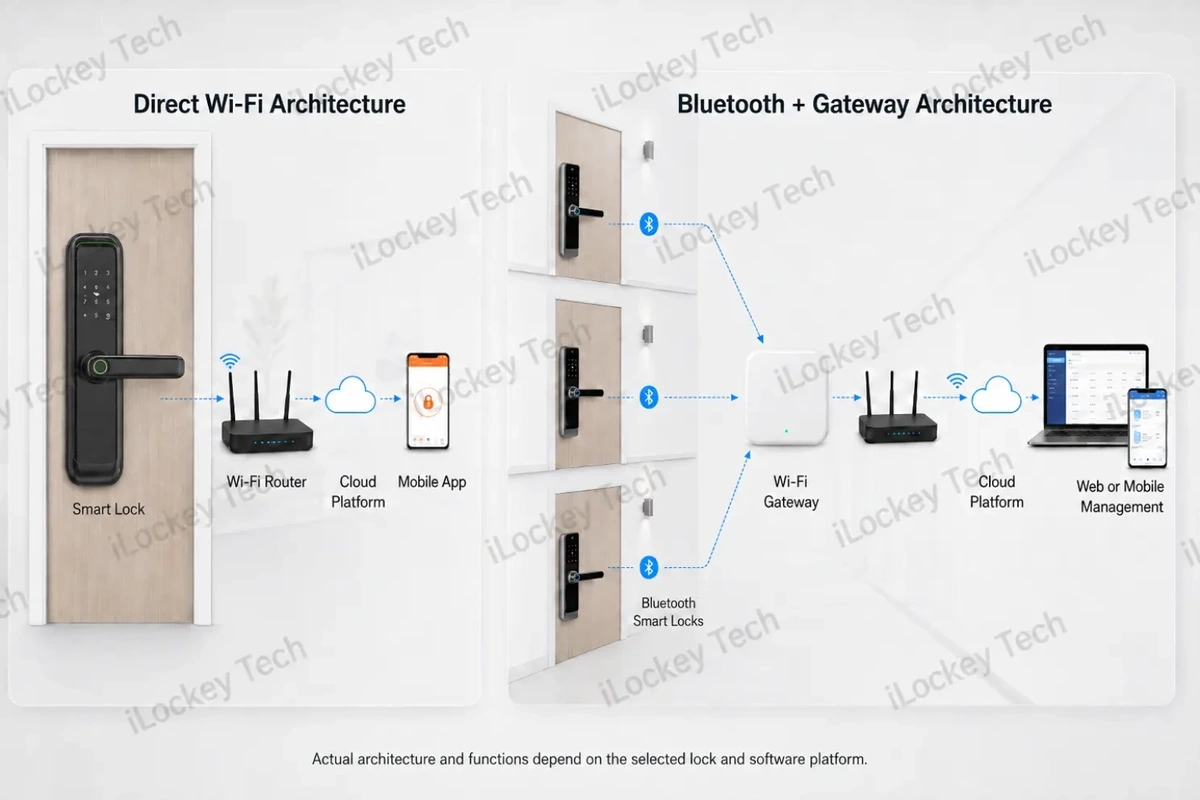
A direct Wi-Fi smart lock contains a Wi-Fi communication module that connects the lock to a local wireless router. The router provides the internet connection between the lock, the cloud platform and the mobile application.
A simplified architecture is: Smart Lock → Wi-Fi Router → Cloud Platform → Mobile App / Smart Home System
Because the lock connects directly to the router, a compatible model does not need a separate Wi-Fi gateway for its normal cloud connection. This can reduce the number of devices that must be purchased, powered, installed and maintained.
Direct Wi-Fi does not mean that every lock remains continuously awake or provides identical remote functions. Battery-powered locks use different wake-up and communication strategies, and the available features depend on the selected hardware, firmware, application and cloud configuration.
B2B buyers should therefore confirm the actual capabilities of the quoted model rather than assuming that every Wi-Fi lock provides the same passwords, alerts, video functions, OTA updates or automation options.
2. The Two Main Application Directions
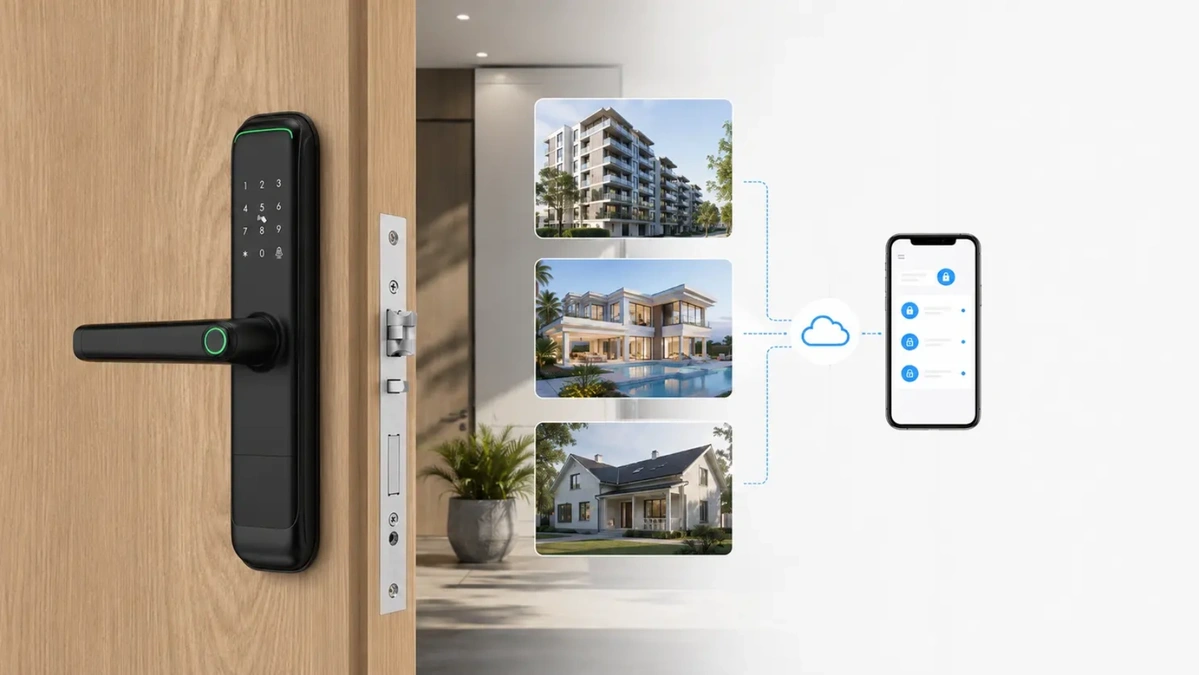
iLockey has over 10 years of service experience in the smart lock industry, and we have a deep understanding of Wi-Fi smart lock applications. The following are two main application directions summarized based on our experience.
1) Standalone Remote Access for Small Applications
The first application direction is a simple standalone access solution for one door or a small number of doors. The goal is not to build a complex building-wide access system. It is to make daily access easier without installing an additional gateway.
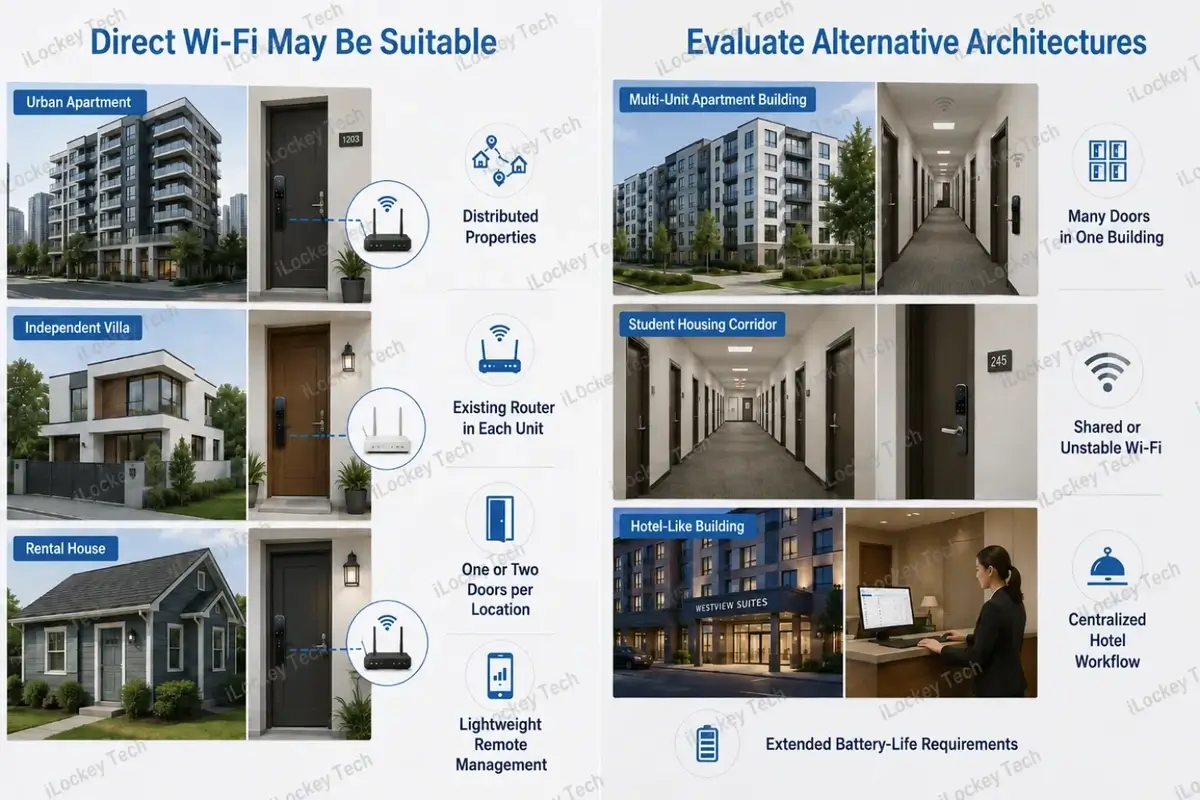
Typical projects include private homes, villas, second homes, small offices, individual rental units and a limited number of distributed properties. Each location normally has its own router and its own door-management workflow.
Depending on the selected model and platform, an administrator may be able to manage family members, visitors, cleaners or maintenance personnel through permanent, temporary or scheduled credentials. Access records, low-battery notifications and remote operations may also be available. The exact functions must be confirmed for the selected product.
For these applications, the commercial value is straightforward: fewer devices, a shorter installation process and a simpler proposition for the end user. A distributor can offer a connected lock without asking the customer to purchase, power and configure another gateway.
2) An Entry Point for Smart Home and Smart-Furnishing Packages
The second application direction is smart home integration. Smart home integrators, property developers and smart-furnishing companies often supply lighting, curtains, sensors, cameras, environmental controls and other connected products as one package. The smart lock can become the first identity and access point within that package.
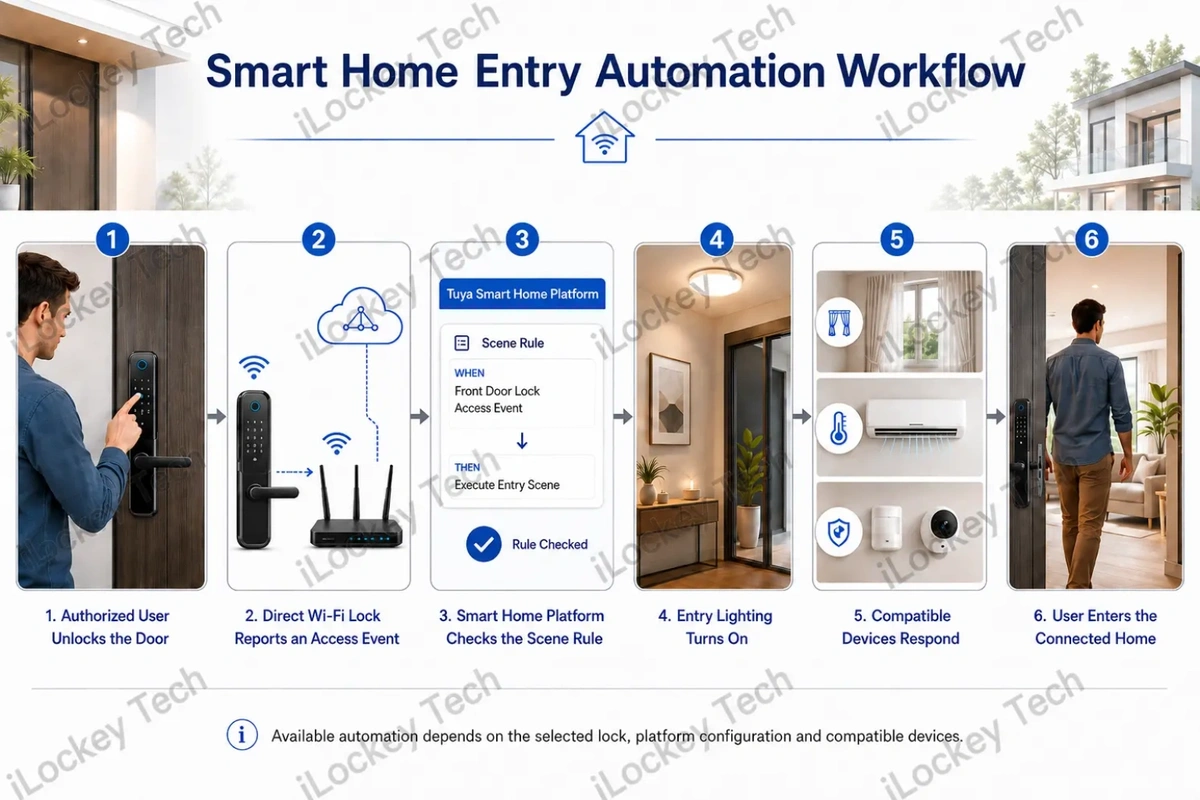
For a compatible Tuya-based solution, an unlocking event can be configured as a condition in a smart scene. For example, when an authorized user unlocks the door, the entry light may turn on or selected connected devices may change state. A leaving scene may also be created when supported by the selected lock and ecosystem configuration.
This does not mean that every device combination works automatically. Scene linkage depends on the data points exposed by the lock, the platform configuration, the compatible devices and the automation rules set in the application.
For B2B buyers, the value is not simply remote unlocking. The lock can be included in a broader connected-home portfolio, managed through a compatible ecosystem and sold as part of a complete smart living package.
3. Why Direct Wi-Fi Can Be Attractive for the Right Project
Direct Wi-Fi connectivity offers many benefits. Below are the ones our customers have mentioned most frequently.
1) Fewer Hardware Components
A gateway is another device that must be purchased, powered, paired, connected and supported. Removing it can simplify a small installation and reduce the number of potential service points.
This benefit is most meaningful when only one or two locks are installed at a location. In a building with many nearby doors, sharing a gateway may be more efficient than connecting every lock directly to Wi-Fi.
2) A Simpler Sales Proposition
For distributors and smart home brands, a direct Wi-Fi model is easier to explain to customers who already understand their home router and mobile application. The product can be positioned as a connected residential lock rather than as a multi-device access control project.
This simpler proposition can also reduce presales questions about gateway quantity, placement and power supply. However, the seller must still explain router compatibility, Wi-Fi coverage and battery expectations accurately.
3) Compatibility with Connected-Home Portfolios
A direct Wi-Fi lock can be commercially valuable when the buyer already sells compatible smart home products. Instead of offering the lock as an isolated item, the buyer can combine it with lighting, sensors, cameras and other devices in a coordinated product package.
The decision should be based on confirmed ecosystem compatibility, not on the number of functions printed in a catalogue. Buyers should test the real scene linkage, app workflow and device response before launching the package.
4. Direct Wi-Fi Smart Lock vs. Bluetooth Lock with Gateway
When our customers are evaluating their options, they often ask us this question: Which is better — a direct Wi-Fi smart lock or a Bluetooth lock with a gateway? Both architectures can support remote management, but they reach the cloud through different communication paths.
A direct Wi-Fi lock connects to the router itself. A Bluetooth lock communicates locally with a nearby gateway, and the gateway then connects through a router to the cloud platform. The correct comparison is therefore not “connected” versus “not connected.” It is one lock-to-router connection versus local Bluetooth communication shared through a gateway.
For easy comparison, we have summarized the following table for your quick reference.
| Comparison Point | Direct Wi-Fi Smart Lock | Bluetooth Lock with Wi-Fi Gateway |
| Network architecture | Each compatible lock connects directly to a router. | Multiple nearby locks communicate with a gateway; the gateway connects through a router. |
| Additional hardware | No separate gateway is required for compatible models. | Gateway and power supply are required. |
| Suitable layout | One or a few doors at independent locations. | Many doors concentrated in one building or zone. |
| Network planning | Stable Wi-Fi is needed near each door. | Gateway coverage, gateway power and router connection must be planned. |
| Battery considerations | Wi-Fi signal quality, wake-up strategy and added video functions can affect consumption. | Bluetooth is generally designed for lower-power local communication. |
| Main maintenance points | Router changes, Wi-Fi password, signal quality and individual lock connection. | Gateway power, router connection, gateway placement and Bluetooth coverage. |
| Typical applications | Homes, villas, small offices, distributed rental units and smart home packages. | Apartments, student housing, multi-door projects and some hospitality applications. |
Neither architecture is universally better. Direct Wi-Fi is attractive when simplicity at an individual location matters. A gateway-based solution may be more practical when many doors can share the same local communication infrastructure.
5. When Direct Wi-Fi Is Not the Best Choice?
Of course, our customers also ask: What should I do when direct Wi-Fi connectivity is not the best option? This is also a concern that many buyers have when making a purchase. Today, iLockey, drawing on our practical experience, would like to offer some suggestions for your reference.
1) Many Doors in One Building
A hotel, student residence or apartment building may contain dozens or hundreds of locks. In these environments, the project requires more than individual mobile-app control. Buyers must consider centralized permissions, staff workflows, common-area access, network design, maintenance and future expansion.
A Bluetooth gateway architecture, dedicated hotel lock system or another centralized solution may be easier to manage than connecting every lock independently to the local Wi-Fi network.
2) Weak, Shared or Frequently Changed Wi-Fi
Direct Wi-Fi depends on the network available near the door. Thick walls, metal doors, distant routers, shared networks and frequent password changes can create service problems.
Before approving a project, test the actual signal at representative doors. Do not judge coverage from the router location alone.
3) Projects Requiring Maximum Battery Efficiency
Battery life depends on the lock hardware, communication strategy, signal strength, opening frequency and additional functions. Camera, electronic peephole, doorbell and video features can create very different consumption patterns from a basic keypad lock.
If long maintenance intervals are the primary requirement, compare the actual tested consumption of the selected Wi-Fi and Bluetooth solutions rather than relying on a generic battery-life claim.
4) Hotel and Specialized Access Workflows
A standard Tuya Wi-Fi residential lock should not be presented as a hotel PMS solution by default. Hotels may require room-based front-desk workflows, RFID cards, staff and master permissions, public-area access, elevator control, audit functions and integration with hotel systems.
These projects should be evaluated separately using a dedicated hotel lock platform, a gateway-based system or a customized architecture that matches the real operational process.
6. Remote Management Functions: Confirm the Actual Model
The greatest convenience of a Wi-Fi smart lock is the ability to remotely control the door lock via a mobile device. Below, we will discuss its remote management features.
1) Users and Credentials
Depending on the lock and platform, administrators may be able to add household members, create temporary users and assign credentials such as passwords, fingerprints, cards or mobile access.
For rental or service scenarios, buyers should confirm which temporary credential types are supported, whether they require the lock to be online, how they are cancelled and what happens during a network interruption.
2) Access Records and Notifications
Access records, low-battery alerts, tamper alarms and repeated-error notifications can improve visibility. The timing and detail of notifications depend on the selected model, network condition and platform configuration.
Lock status and door status are not always the same. A lock may report whether it is locked or unlocked, but confirming that the door is physically closed usually requires a suitable door sensor or contact.
3) Remote Operations
Some models support remote unlocking or remote credential management. The security workflow may require administrator confirmation, a lock wake-up event or another verification step.
The article, product page and quotation should describe the actual operation instead of using a broad claim such as “unlock from anywhere” without explaining the conditions.
4) OTA and Platform Updates
Selected Tuya Wi-Fi lock configurations can support OTA updates for the Wi-Fi module or other firmware components. This capability is model- and platform-specific and should be confirmed during product selection.
An OTA option is useful only when the supplier has a controlled testing and release process. Buyers should ask which component is updated, who authorizes the release and how failed updates are handled.
5) Smart Home Ecosystem Integration
Smart home integration is the second major reason to select a Tuya-based direct Wi-Fi lock. The lock can participate in scene automation with other compatible devices managed within the same ecosystem.
A typical arrival workflow may be: Authorized User Unlocks → Lock Reports an Access Event → Smart Home Platform Checks the Scene Rule → Compatible Devices Respond
Possible responses may include turning on the entry light, changing a security mode or activating other compatible devices. A leaving workflow can also be configured when the selected lock data points and ecosystem support the required trigger.
The buyer must verify the actual scene conditions and actions available for the quoted model. A smart lock may be part of the same app without exposing every event needed for a particular automation.
For OEM and smart home projects, the supplier should confirm the platform version, app environment, scene-linkage data points, compatible device categories and testing responsibilities before mass production.
7. Selection Priorities for Different B2B Buyers
If you’re still unsure about which factors to consider when making a purchase, iLockey has been deeply rooted in the smart lock industry for nearly 20 years, providing solutions to a wide range of customers. Below, based on different customer profiles, we’ll guide you on what matters most when making your decision.
1) Smart Home Companies and System Integrators
Confirm ecosystem compatibility, scene-linkage triggers, mobile-app workflow and the integration responsibilities of each party.
Ask whether the project needs a standard Tuya application, an OEM app, a web interface or further development. API or SDK availability should be confirmed for the exact platform and commercial arrangement rather than assumed from the lock protocol alone.
2) Distributors and Smart Lock Brands
Define the target market clearly. A direct Wi-Fi lock for a smart home package requires different positioning, training and after-sales materials from a hotel lock or a large apartment project.
Review product reliability, installation compatibility, app language, documentation, certification coverage, spare parts, packaging and warranty procedures. The platform name alone does not replace product-level due diligence.
3) Property Operators and Small Rental Managers
Evaluate the number and distribution of doors, who creates credentials, who replaces batteries, how internet interruptions are handled and how staff access is removed.
A simple Wi-Fi lock can work well for a few independent locations. As the operation grows, reassess whether a centralized platform or gateway architecture would reduce management effort.
4) Door, Furniture and Whole-Home Solution Manufacturers
Confirm the door construction, mortise, panel dimensions, opening direction, wiring and installation tolerances before approving the product.
For whole-home packages, test the lock together with the other compatible devices and include the real automation steps in dealer training and installation instructions.
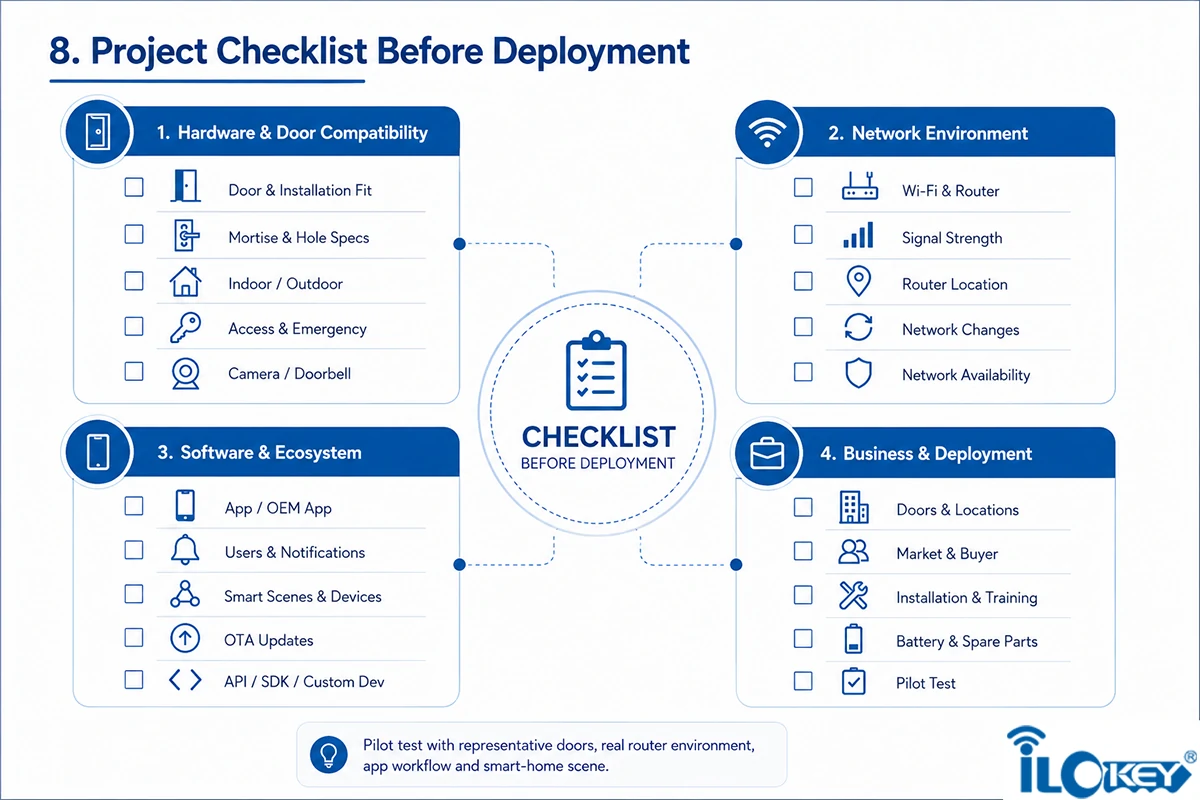
8. Project Checklist Before Deployment
iLockey has a proven track record of helping customers integrate Wi-Fi smart locks into their projects seamlessly. To ensure a smooth installation, we’ve compiled a pre-deployment checklist based on real-world project experience. Feel free to use it as a reference when you’re getting ready to install.
1) Hardware and Door Compatibility
- Door material, thickness and opening direction
- Existing mortise, backset, centre distance and holes
- Indoor or outdoor exposure
- Required access methods and emergency entry
- Camera, electronic peephole or doorbell requirements
2) Network Environment
- Confirmed Wi-Fi frequency and router compatibility
- Signal strength measured near representative doors
- Router location and wall interference
- Procedure for router replacement or password changes
- Network availability during installation and after-sales service
3) Software and Ecosystem
- Exact mobile app or OEM app
- User, password and notification functions required
- Smart scene triggers and compatible devices
- OTA capability for the selected model
- API, SDK or custom development requirements, if any
4) Business and Deployment
- Number of doors and whether locations are distributed or concentrated
- Target market and buyer type
- Installation responsibility and training materials
- Battery replacement and spare-parts plan
- Pilot-test scope before mass production or deployment
For a B2B project, a pilot should include representative doors, the real router environment, the intended app workflow and the planned smart-home scene. A catalogue demonstration alone is not enough to confirm project suitability.
9. Wi-Fi smart lock FAQs
We’ve noticed that customers most frequently ask the following questions before placing an order. We’ve listed these questions along with their answers here for your reference when purchasing a Wi-Fi smart lock.
Q1: Does a direct Wi-Fi smart lock require a gateway?
A compatible direct Wi-Fi model connects to a Wi-Fi router without a separate Bluetooth gateway. It still requires a suitable router and internet connection for cloud-based remote functions.
Q2: Can the lock still open if the internet is unavailable?
Locally stored credentials may continue to work according to the product design. Cloud management, remote operations and online notifications normally depend on network availability. Confirm the offline behaviour of the selected model.
Q3: Does every Tuya Wi-Fi lock support the same smart home scenes?
No. Scene linkage depends on the lock data points, product configuration, app environment and compatible devices. Test the required trigger and action before confirming the project.
Q4: Is a Tuya Wi-Fi residential lock a PMS hotel-lock solution?
No, it should not be presented as a PMS solution by default. Standard Tuya Wi-Fi residential locks are better positioned for individual homes, villas, small rental units and smart home ecosystems. Hotel and PMS projects should be evaluated using a dedicated hotel lock or customized system architecture.
Q5: Does a direct Wi-Fi lock support both 2.4 GHz and 5 GHz?
Support depends on the selected module and model. Buyers should confirm the exact Wi-Fi specification and router settings before installation rather than assuming dual-band compatibility.
Q6: How long will the batteries last?
There is no universal answer. Battery life depends on capacity, opening frequency, signal quality, wake-up strategy, temperature and additional functions such as a camera, electronic peephole or doorbell.
Q7: Is direct Wi-Fi better than Bluetooth with a gateway?
Neither architecture is universally better. Direct Wi-Fi can simplify small independent installations. Bluetooth with a gateway may be more practical for many doors concentrated in one building.
10. Conclusion
Direct Wi-Fi smart locks create real value in two main directions. They can simplify standalone access management for homes, villas, small offices and a limited number of rental units. They can also serve as an access entry point in compatible smart home and whole-home product packages.
Their value is not that Wi-Fi is always more advanced. It is that the architecture can remove a separate gateway and fit naturally into a connected residential ecosystem when the project conditions are right.
For many doors in one building, specialized hotel workflows, unstable Wi-Fi or demanding maintenance requirements, a Bluetooth gateway, hotel lock system or customized architecture may be more suitable.
With core team members bringing over 20 years of experience in the smart lock industry, iLockey provides OEM, ODM and project-based smart lock solutions for global B2B customers. Product recommendations are made according to the actual door, network environment, software ecosystem, project scale and management workflow.
If you planning a direct Wi-Fi smart lock or smart home integration project? Share your door specifications, target market, project quantity, required access methods and smart home compatibility requirements with iLockey. A representative sample and real-environment pilot can help confirm the right solution before mass production or deployment.