Planning a locker project often changes the cost equation. A building may need only dozens of entrance locks, while the same facility can contain hundreds or thousands of locker doors. At that scale, a small difference in unit price, installation time, battery service or management workload can become a major operating cost.
The lowest-priced lock is therefore not always the lowest-cost solution. Commercial buyers need to evaluate the lock mechanism, user credential, operating mode, management architecture and cabinet compatibility as one system. This guide explains how to compare smart locker locks for gyms, offices, schools, hotels, parcel storage, retail display cabinets and other commercial storage projects.
1. What Is a Smart Locker Lock?
A smart locker lock is an electronic lock designed for lockers, cabinets, drawers and other storage compartments. Unlike an entrance door lock, its main business value is often not perimeter security alone. It is controlled access, efficient assignment and, where the system supports it, traceability of who accessed which compartment and when.
This difference affects almost every purchasing decision. A door-lock project may prioritize forced-entry resistance, fire-door compatibility and heavy mechanical duty. A locker project usually places more weight on compact installation, fast daily use, large-scale administration, battery maintenance and cost per compartment.
| Dimension | Smart Door Lock | Smart Locker Lock |
| Primary role | Control entry to a room or secured area | Control access to an individual storage compartment |
| Typical hardware | Front/rear trim, handle and mortise/deadbolt | Compact cam, latch, bolt or concealed mechanism |
| Deployment scale | Usually tens to hundreds per property | Often hundreds to thousands of compartments |
| Management focus | Who may enter the space | Who may use which locker, when and under what mode |
| Maintenance priority | Per-door reliability and mechanical security | Batch management, battery service and rapid replacement |
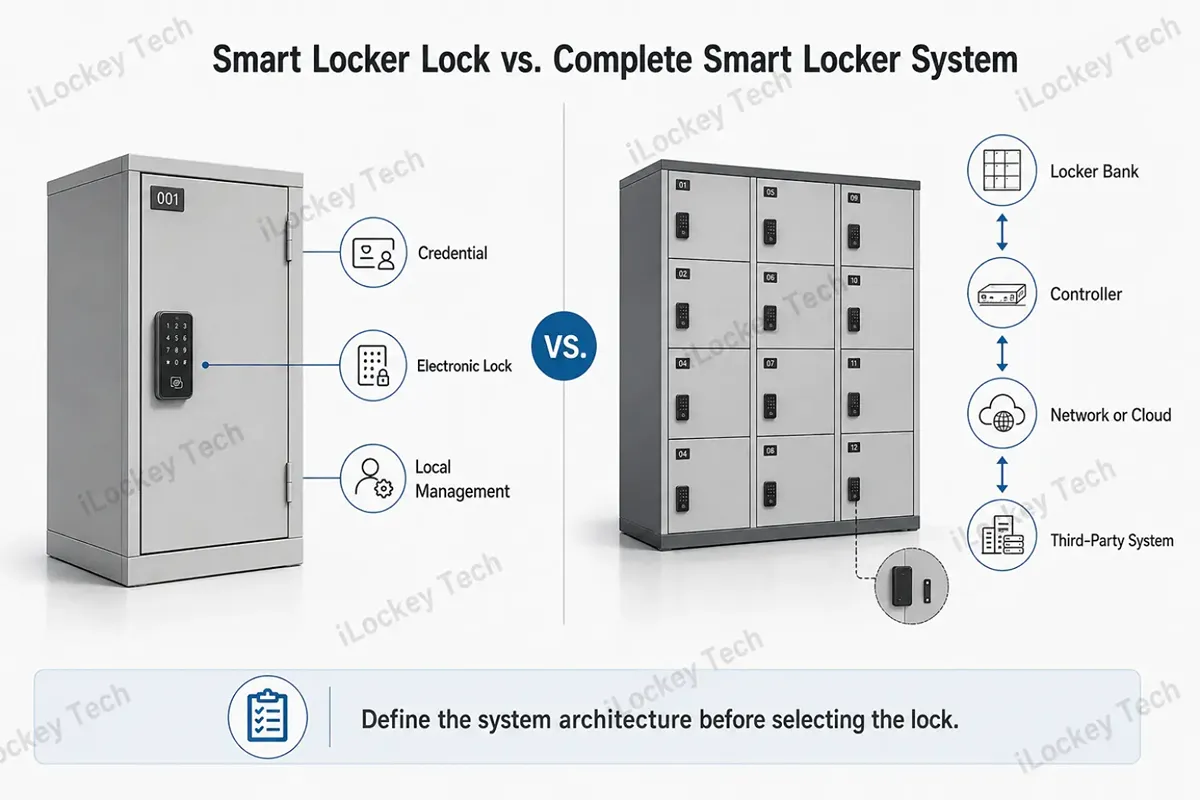
1) Smart Locker Lock vs. Complete Smart Locker System
A single electronic locker lock should not be confused with a complete automated locker system. A standalone lock can authenticate a user and secure one compartment. A parcel locker, automated pickup wall or centrally assigned locker bank may also require a controller, power distribution, occupancy logic, door sensors, a kiosk or scanner, cloud software and integration with an order or identity-management platform.
This distinction matters during RFQ preparation. If the project needs automatic compartment allocation, real-time door status, order-linked pickup codes or a central touchscreen, buyers should define the complete system architecture first rather than selecting an individual lock and expecting it to provide the entire workflow.
2. Understand the Four Layers of a Locker Lock Solution
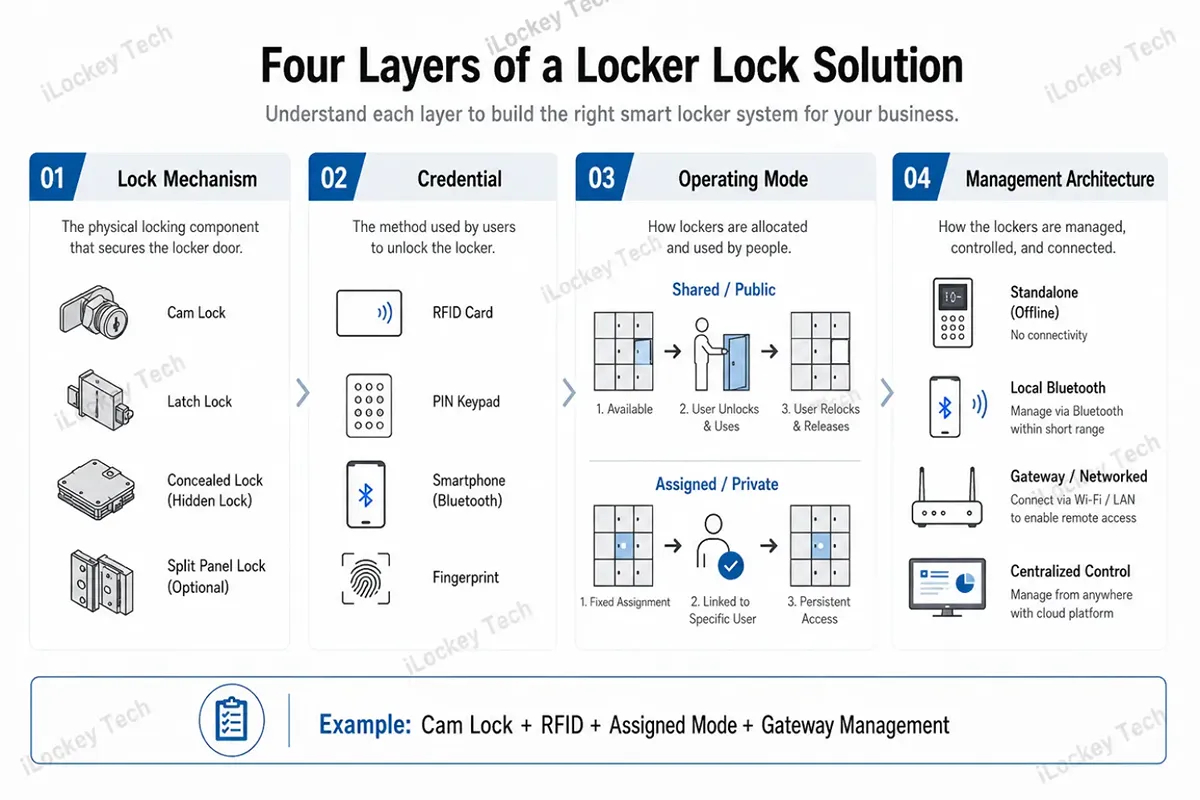
One of the most common specification mistakes is to treat RFID, Bluetooth, Wi-Fi and fingerprint as if they were competing types of lock. They describe different layers of the solution. A project can, for example, use an electronic cam lock with RFID credentials, Bluetooth administration, assigned-user mode and a gateway-connected management platform.
1) Lock Mechanism
Start with the physical locking method. Common structures include electronic cam locks for replacing mechanical cabinet locks, bolt or latch locks, slam-latch mechanisms, concealed locks and split-panel designs where the reader and locking mechanism are separated. The correct choice depends on the cabinet material, internal clearance, strike position and whether the project is a retrofit or new cabinet production.
2) User Credential
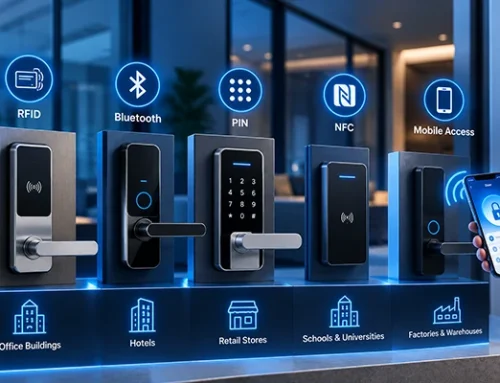
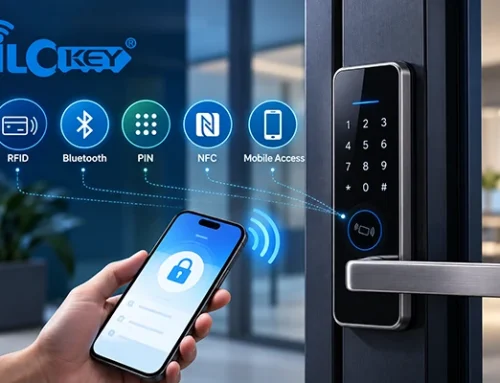
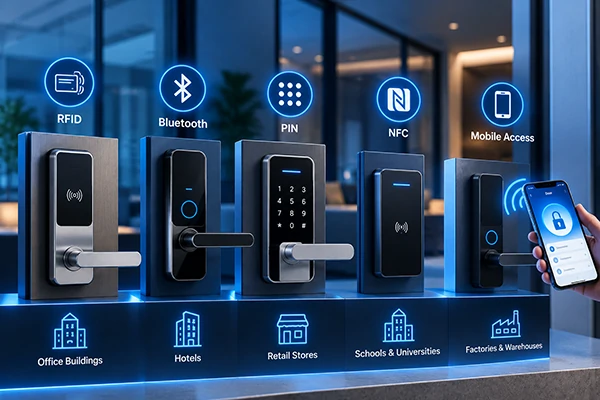
The credential is how the user proves permission. Commercial projects commonly use RFID cards or wristbands, PIN codes, mobile Bluetooth credentials and, in selected applications, fingerprints. The credential should match the user profile rather than being chosen only because the lock supports more features.
3) Operating Mode: Shared vs. Assigned
Operating mode defines how the locker is used. In shared or public mode, a user selects an available locker, temporarily claims it with an allowed credential, and the locker returns to available status after the defined release workflow. This is common in gyms, pools, libraries and visitor storage areas.
In assigned or private mode, a locker is linked to a specific employee, member, room, department or other fixed user group for a longer period. This model is more suitable for staff lockers, long-term storage, tool cabinets and dedicated document storage. Buyers should define this mode before deciding which credential is best.
4) Management Architecture
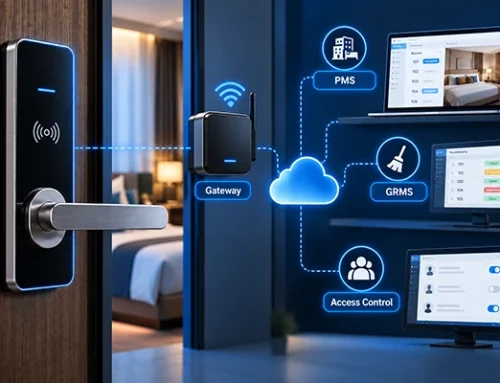
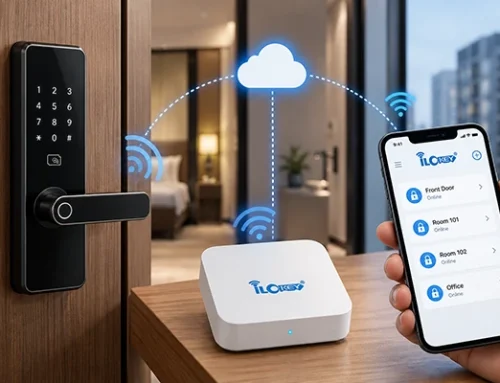
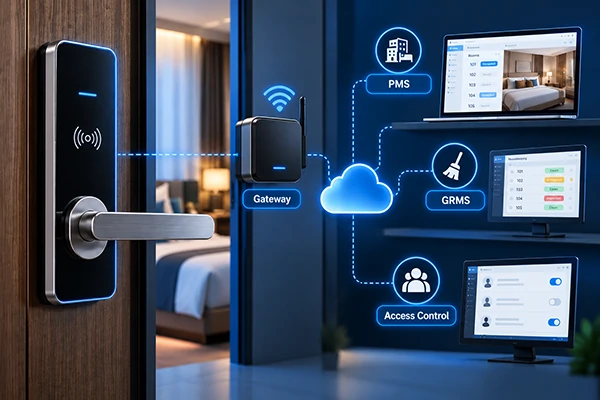
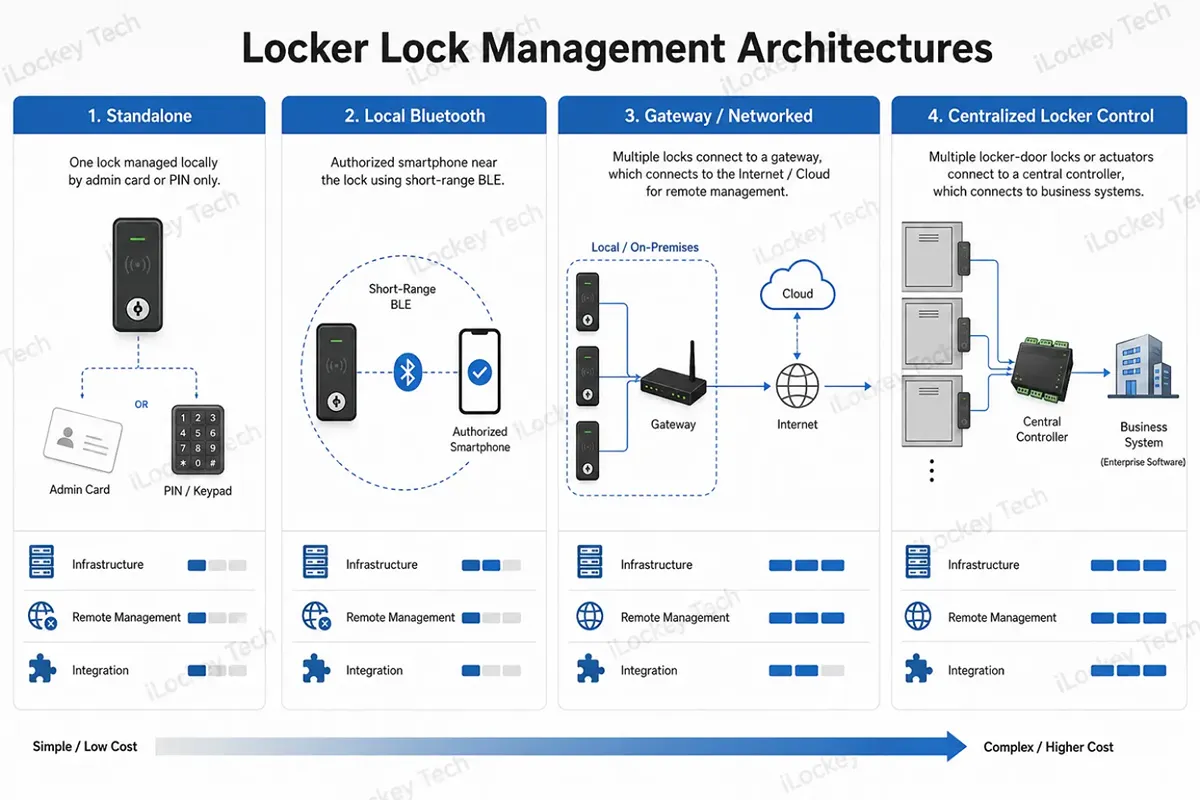
Finally, decide how the locks will be administered. A standalone lock may be sufficient for a small site. Bluetooth can support local mobile management when an authorized phone is near the lock. Remote administration generally requires an internet-connected gateway, controller or other network architecture. Large automated locker banks may instead use centralized hardwired control.
3. Typical Commercial Applications
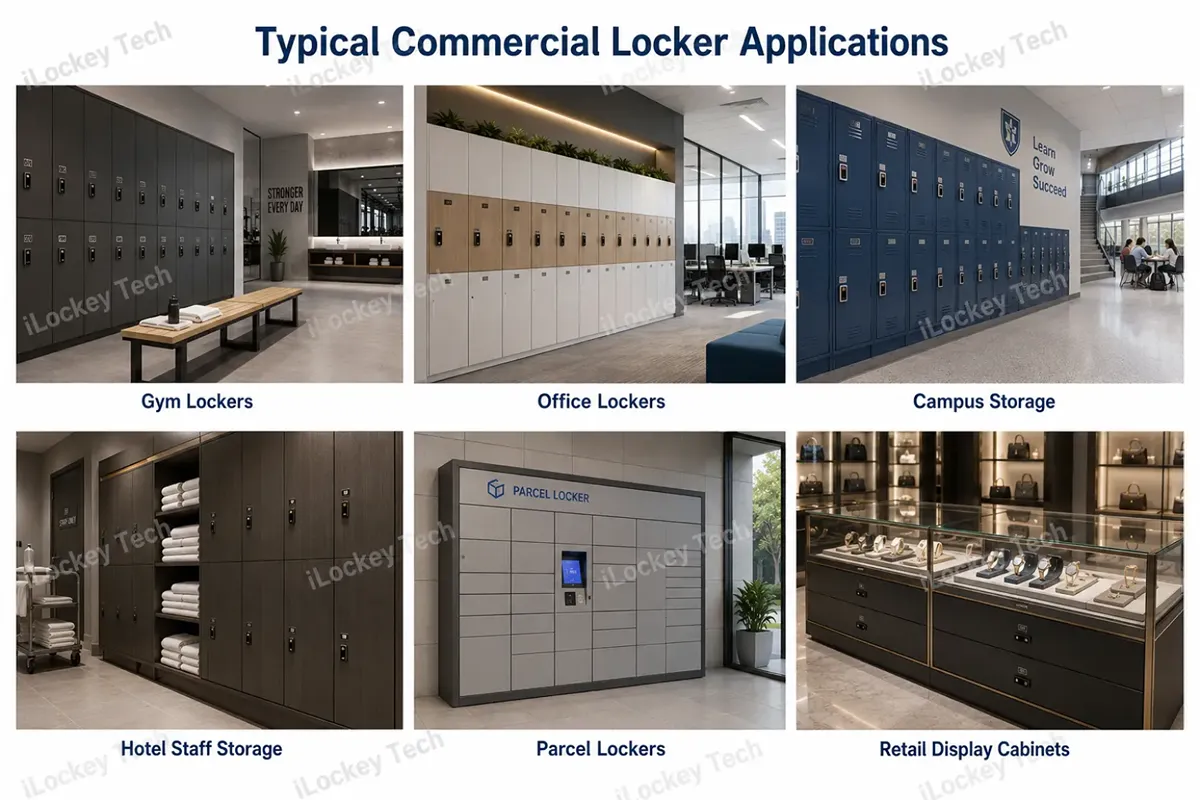
The following commercial applications illustrate how locker usage, user turnover, environmental conditions and management requirements influence the choice of keyless cabinet lock.
1) Gyms and Swimming Facilities
Shared-use lockers are common where members need fast self-service storage and the same compartments are reused throughout the day. RFID wristbands, member cards or PIN-based access can reduce front-desk handling. For pools and wet changing areas, the exact lock model, cabinet design and installation method must be evaluated for moisture exposure rather than assuming that any electronic locker lock is suitable.
2) Employee and Office Lockers
Office lockers typically have more stable users and longer assignment periods. Assigned mode works well, and an existing staff card can be attractive when the locker lock supports the same credential technology and configuration. This can reduce the need to issue an additional card, but compatibility must be tested before rollout.
3) Schools, Libraries and Shared Campus Storage
Campus projects can use either assigned lockers or shared storage depending on the operating policy. RFID student cards and PIN credentials are common approaches because they can support high user turnover without requiring every user to install a dedicated application.
4) Hotel Staff, Linen and Service Storage
Hotels may use electronic cabinet locks for linen rooms, housekeeping storage, staff lockers and selected service cabinets. The important questions are which employee groups require access, whether permissions change by shift or role, and whether access records are needed for internal accountability.
5) Parcel and Temporary Pickup Lockers
Parcel storage often requires more than a standalone smart lock. If a system must generate order-linked pickup codes, assign an empty compartment automatically, report physical door status or integrate with a delivery platform, the project should be designed as a complete locker-control system.
6) Controlled Staff Storage
Tools, documents, keys and controlled supplies may require stronger access accountability than a general employee locker. In these projects, buyers should prioritize permission hierarchy, event logs, emergency procedures and the ability to remove access quickly when staff roles change.
7) Retail Display Cabinets and Drawers
Retailers often want the lock to remain visually unobtrusive while staff can open a display drawer or cabinet quickly. Concealed RFID or Bluetooth-controlled mechanisms can be considered, but mounting space, panel material, strike position and visible drilling requirements should be checked carefully, especially for glass or premium display furniture.
4. Choosing the Right Access Method
The best credential is the one that fits the user workflow and management burden. A fixed employee population, a gym with wristband users and a parcel pickup project may all need different approaches even if the cabinet hardware is similar.
| Access Method | User Experience | Management Consideration | Typical Fit |
|
RFID card / wristband |
Very fast; tap to unlock |
Cards must be issued, replaced and deactivated |
Employees, members, schools, high-frequency users |
|
PIN |
No physical credential required |
Codes need lifecycle rules and protection against sharing |
Temporary users, shared storage, simple projects |
|
Mobile / Bluetooth |
Phone can act as the credential or admin tool |
Requires compatible phones/apps and clear offline/remote architecture |
Managed sites, mobile-first users, integrated projects |
|
Fingerprint |
No card or phone required |
Enrollment, deletion and sensor conditions add management complexity |
Selected dedicated or higher-control cabinets |
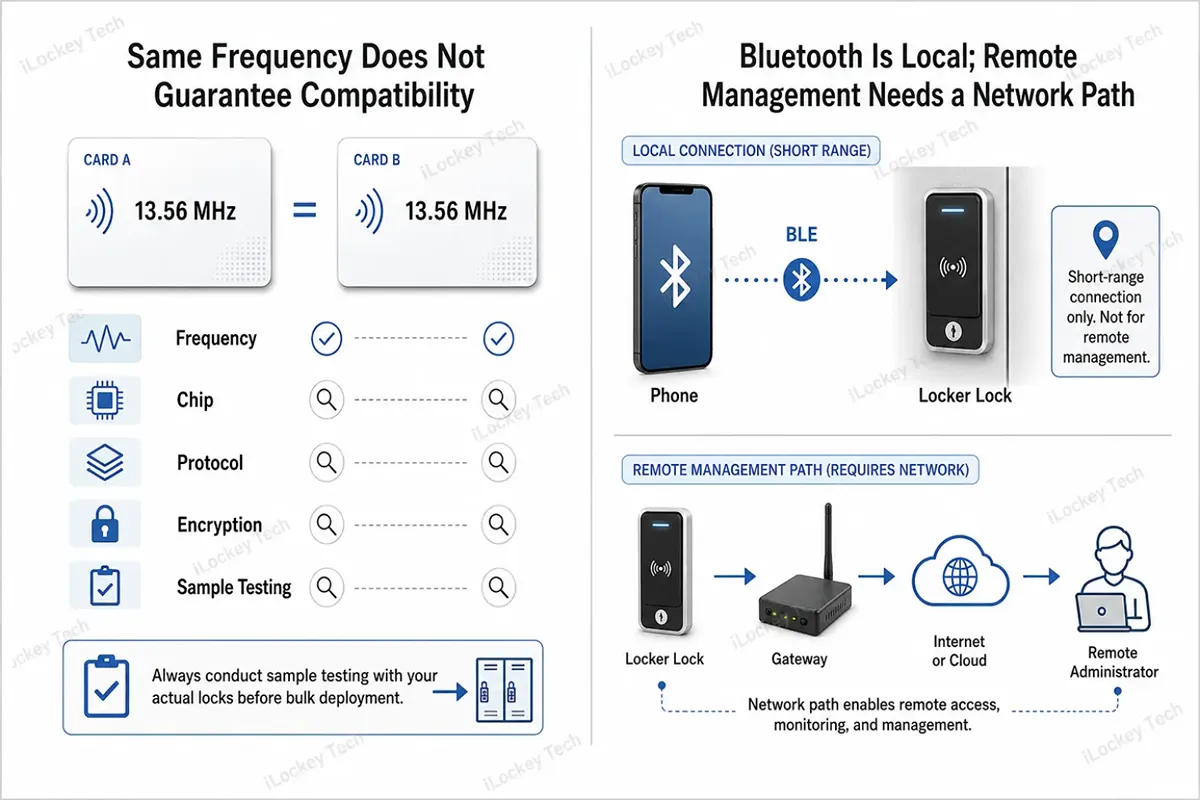
1) RFID Compatibility: Frequency Is Only the First Check
RFID cabinet lock is attractive because an employee card, membership card or wristband may already be part of the user journey. However, two credentials operating at the same frequency are not automatically interchangeable. Buyers should confirm the chip or credential family, protocol, how the lock reads the credential, and any encryption or key requirements.
For retrofit projects, the safest approach is to send several existing cards or wristbands to the lock supplier for compatibility testing before placing a bulk order. This is particularly important when the same credential is expected to work across access control, door locks and locker locks.
2) Mobile Access: Separate Local Bluetooth from Remote Management
Mobile access is useful when operators want to issue or revoke digital permissions without distributing physical cards. But Bluetooth is a short-range communication method; it should not be described as remote internet control by itself. If administrators need to manage locks from another building or city, confirm what gateway, controller, cloud service or third-party integration is required.
5. Cabinet and Installation Compatibility
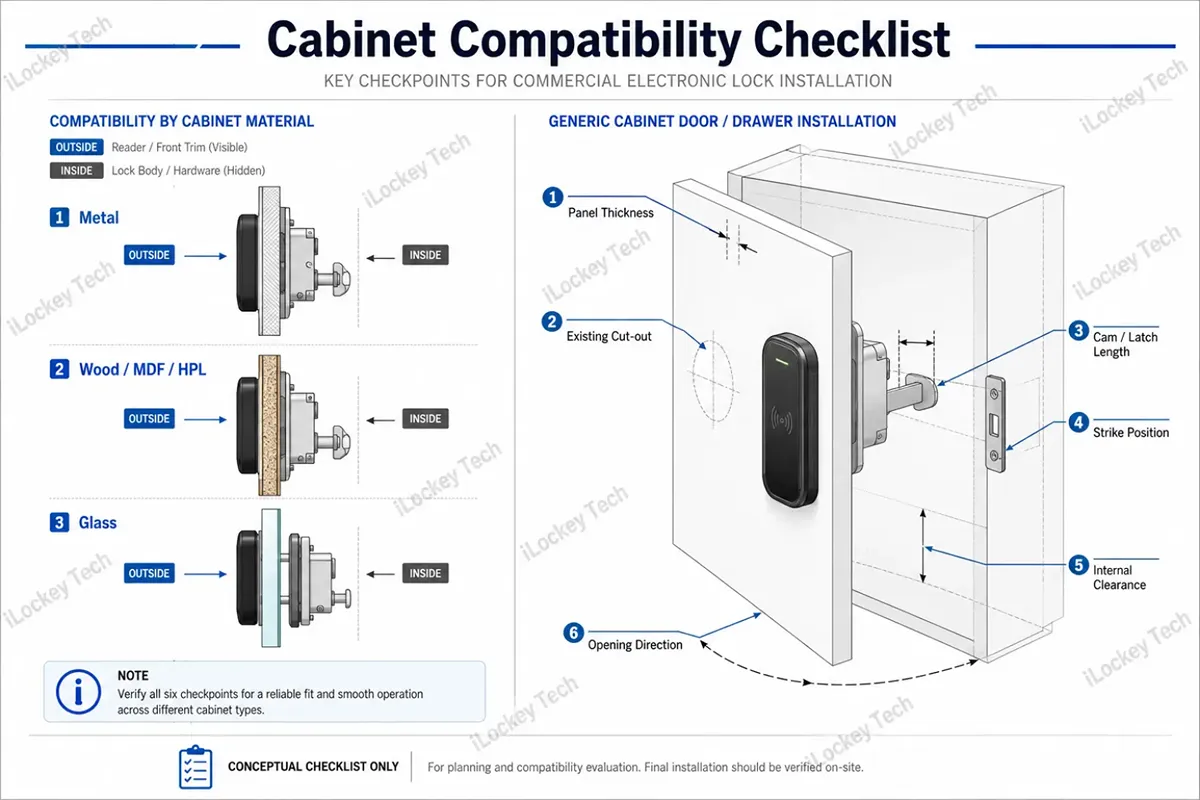
A locker lock can have the right software and still fail the project if it does not fit the cabinet. This is why cabinet manufacturers and retrofit contractors should evaluate mechanical compatibility before comparing feature lists.
1) Cabinet Material and RF Performance
Metal, wood, MDF, HPL/phenolic panels, glass and acrylic each create different installation constraints. Metal cabinets can also affect the performance of internal antennas depending on reader position and enclosure design. The practical solution is to test the actual lock on the actual cabinet construction, especially when RFID or Bluetooth performance is critical.
2) Dimensions, Cut-Outs and Internal Clearance
Confirm panel thickness, cut-out size, cam or latch length, strike position, opening direction and the clearance available behind the door or drawer. For a retrofit, compare the proposed electronic lock with the existing mechanical lock and hole pattern. For new cabinet production, it may be more efficient to design the panel and mounting bracket around the selected lock before mass fabrication.
3) Glass and Premium Display Furniture
Glass display cabinets need special attention because drilling may be restricted or unacceptable. Buyers should confirm whether the solution is intended for framed glass, frameless glass, a wooden base, a metal frame or an internal concealed latch. A concept drawing should never be treated as proof that a specific lock will fit a specific glass cabinet.
6. Management, Networking and Integration
Management architecture has a direct impact on operating cost. If a site has 500 lockers, administrators should not need to walk to every lock for routine permission changes or battery checks unless the project intentionally uses a simple offline model.
1) Standalone, Local Mobile, Gateway and Centralized Control
Standalone locks minimize infrastructure and are often the lowest-complexity option. Local Bluetooth management can make configuration easier while preserving offline lock operation. Gateway-connected or centrally controlled solutions can add remote administration, event synchronization and other system functions, but they also introduce network, software and integration requirements that must be confirmed before deployment.
2) Audit Trail and Physical Door Status Are Different Requirements
An access log can show that a credential was accepted or an unlock command was issued. That does not automatically prove that the physical locker door opened or closed. Projects that require real-time occupancy or door-state monitoring should confirm whether the selected hardware has the necessary bolt-position or door-status sensing and how that data is reported.
3) API and SDK Questions for Integrated Projects
System integrators should define integration requirements at the command and data level: user creation, credential issuance, unlock commands, event records, lock grouping, battery information, door status and error handling. API or SDK availability should never be assumed across every model or platform. The exact interface scope, documentation, cloud dependency and responsibility of each development team should be confirmed during technical evaluation.
For iLockey projects, selected door-lock and cabinet-lock configurations can be planned around a shared app, RFID credential, gateway and management platform. Exact model compatibility, API/SDK scope and centralized logging functions should be confirmed against the selected hardware and software platform before quotation or integration work begins.
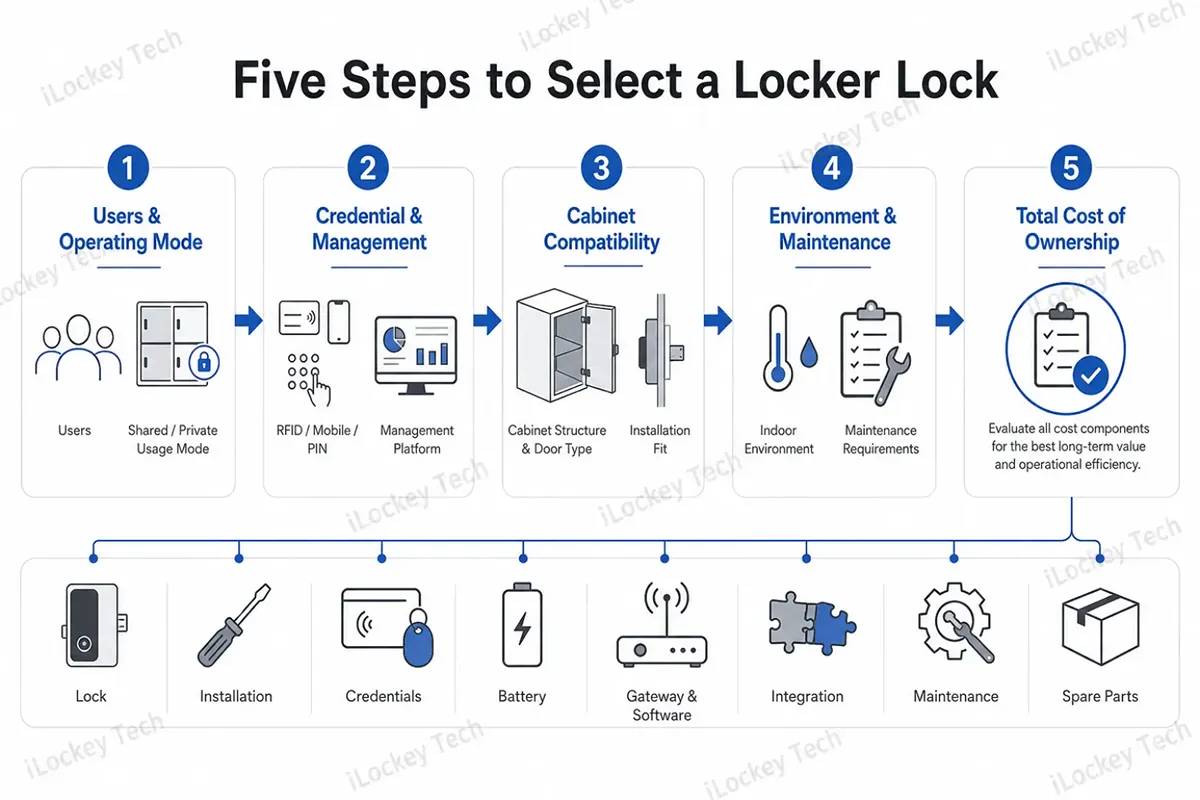
7. A Five-Step Selection Process for B2B Buyers
The following five steps provide a practical framework for evaluating electronic locker locks from user workflow and compatibility to system architecture, maintenance and total cost of ownership.
1) Step 1 – Define Users and Operating Mode
Identify whether users are fixed employees, members, students, visitors, delivery personnel or staff with different permission levels. Then decide whether each locker is shared, assigned or temporarily allocated. This prevents the project from choosing an access method before defining the actual workflow.
2) Step 2 – Choose Credential and Management Architecture
Decide whether RFID, PIN, mobile access or another credential best fits the user. Then determine whether the site can be managed locally or requires remote administration, gateways, centralized control or third-party integration.
3) Step 3 – Verify Cabinet Compatibility
Provide cabinet drawings, panel material and thickness, photos, existing cut-outs and internal dimensions. Confirm the mounting method before approving samples or producing hundreds of cabinet doors.
4) Step 4 – Evaluate Environment and Maintenance
Ask how battery life is measured, how low-battery warnings work, how the lock is opened during a power or battery failure, and how units are replaced. For humid, dusty or semi-outdoor locations, confirm the protection level of the exact product and the complete installation rather than relying on a generic category claim.
5) Step 5 – Calculate Total Cost of Ownership
Compare more than the lock price. A realistic project budget should include cabinet modification, installation labor, RFID cards or wristbands, batteries, gateways or controllers, software fees where applicable, integration work, maintenance labor, spare parts and the cost of future replacement. In a 1,000-compartment project, a small difference in each of these items can outweigh the initial unit-price saving.
TCO CHECK: Lock Hardware + Cabinet Modification + Installation + Credentials + Batteries + Gateway/Controller + Software + Integration + Maintenance Labor + Spare Parts
8. Common Selection Mistakes
- Using door-lock criteria for a locker project. Over-specifying physical security can increase cost without improving the daily locker workflow.
- Comparing only the unit price. Credentials, cabinet machining, installation, batteries, software and service labor may materially change total project cost.
- Ignoring battery maintenance. The question is not only how long one battery lasts, but how hundreds of units will be monitored and serviced.
- Using an ordinary indoor lock in a wet or harsh environment without verifying the exact model and cabinet installation.
- Assuming all cards at the same RFID frequency are compatible. Always test the actual credential.
- Choosing RFID, Bluetooth or fingerprint before defining whether lockers are shared, assigned or centrally allocated.
9. What to Confirm Before Bulk Ordering?
Before issuing a purchase order, the smart lock supplier should be able to answer the following questions:
- What is the cabinet material, panel thickness and internal clearance?
- Is the project a retrofit or new cabinet production?
- What lock mechanism and mounting method fit the cabinet?
- Who are the users, and is the locker shared or assigned?
- Which credential will be used: RFID, PIN, mobile or fingerprint?
- If existing RFID cards are reused, have physical samples been tested?
- Must the locks work offline, and what functions still work without a network?
- Is remote administration required? If yes, what gateway or controller is needed?
- Are access logs enough, or is real physical door-status feedback required?
- How are low-battery warnings and emergency opening handled?
- Does the project require API, SDK or another third-party interface?
- What software, cloud or integration fees apply, if any?
- How will locks be grouped, named and maintained at scale?
- What spare parts and replacement procedures are required?
- Has a pilot been tested on the real cabinet before mass deployment?
10. FAQ for Commercial Locker Lock Projects
The following are common questions about your commercial locker lock projects.
1) How much does a smart locker lock cost?
Price depends on the lock mechanism, credential technology, materials, networking requirements, order quantity and customization. A lower hardware price can be offset by additional cabinet machining, credential costs or maintenance labor, so compare total project cost rather than one lock in isolation.
2) Can we start with a small pilot order?
A pilot is strongly recommended before a large deployment because it can validate cabinet fit, user workflow, credential compatibility and management procedures. The available sample quantity and MOQ depend on the selected standard or customized model and should be confirmed during quotation.
3) Can our existing employee or membership card open the locker?
Possibly, but the card frequency alone is not enough to confirm compatibility. Send physical credential samples and technical information to the supplier for testing before bulk production.
4) What if users do not want to use a smartphone?
Do not force a mobile-only workflow unless the user population supports it. RFID cards or wristbands and PIN credentials can be more practical for staff, students, members or temporary users depending on the project.
5) How should hundreds of locks be managed?
The management method should support a clear naming and grouping structure by building, floor, zone or locker bank. If administrators require remote permission changes, synchronized event records or centralized battery monitoring, select an architecture that supports those functions instead of relying on individual lock-by-lock configuration.
6) What happens if the battery is exhausted or a lock fails?
The selected model should have a defined emergency procedure, such as an authorized service credential, emergency power input, mechanical override or replaceable locking module where applicable. The exact method varies by product and should be documented before deployment.
7) Can locker locks integrate with our existing software?
Integration is possible only when the selected platform provides the required interface. Before development starts, confirm the API/SDK scope, supported commands and events, authentication method, cloud dependency, documentation and which party is responsible for each part of the integration.
11. Conclusion
A successful locker project starts with the operating model, not the feature list. Define who will use the lockers, whether they are shared or assigned, how administrators need to manage permissions, what the cabinet construction allows and what happens when the network or battery is unavailable. Only then should you compare RFID, PIN, Bluetooth, fingerprint, gateway and system-integration options.
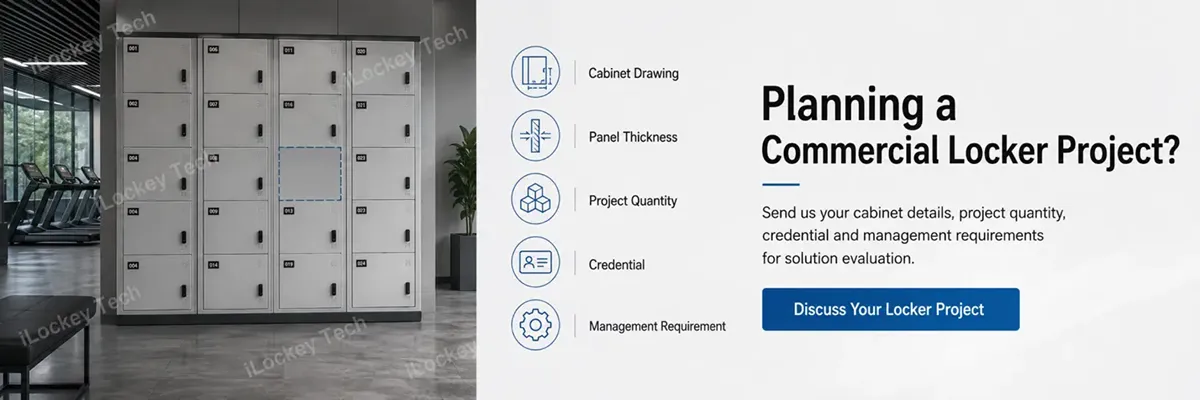
For B2B projects, iLockey recommends validating the real cabinet and user workflow with a sample or pilot before mass deployment. Send us your cabinet drawings or photos, panel thickness, project quantity, preferred credential and management requirements. We can help evaluate the appropriate lock structure and management approach before you proceed to bulk production or system integration.